Diagnostic Readings, Tests, About
H86938-UN-20NOV06
H86231-UN-10JAN07
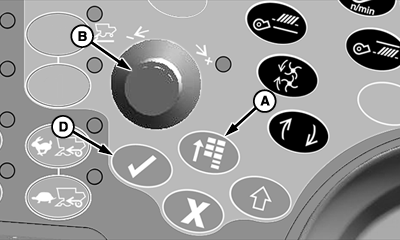
A - Main Menu Switch
B - Selection Dial
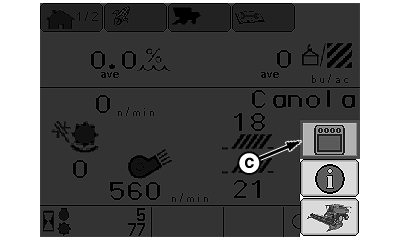
C - Display Settings Icon
D - Confirm Switch
Reading Menu:Press main menu switch (A) and rotate selection dial (B) until display settings icon (C) is highlighted.
Press confirm switch (D).
H86238-UN-07MAR07
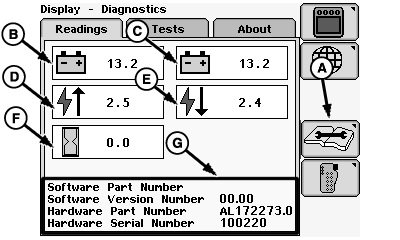
A - Diagnostic Icon
B - Unswitched Voltage
C - Switched Voltage
D - CAN High Voltage
E - CAN Low Voltage
F - Operation Hours
G - Software and Hardware Information
Rotate selection dial until diagnostic icon (A) is highlighted and press confirm switch.Screen will display the following:
- Unswitched Voltage (B)
- Switched Voltage (C)
- CAN High Voltage (D)
- CAN Low Voltage (E)
- Operation Hours (F)
-
Software and Hardware Information (G)
- Software Part Number
- Software Version Number
- Hardware Part Number
- Hardware Version Number
H86243-UN-07MAR07
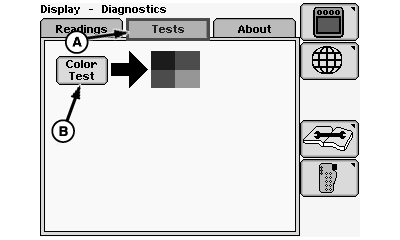
A - Tests Menu
B - Color Test
Tests Menu:Rotate selection dial until tests menu (A) is highlighted and press confirm switch.
Rotate selection dial to select:
- Color Test (B)
Press confirm switch once color test is highlighted.
CommandCenter display will test color of screen (diagram will appear with blue, red, and green).
H86244-UN-07MAR07
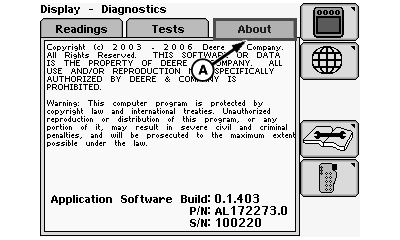
A - About Menu
About Menu:Rotate selection dial until about menu (A) is highlighted and press confirm switch.
CommandCenter display will show John Deere software information and copyright information.
H86938-UN-20NOV06
H86236-UN-10JAN07
A - Main Menu Switch
B - Selection Dial
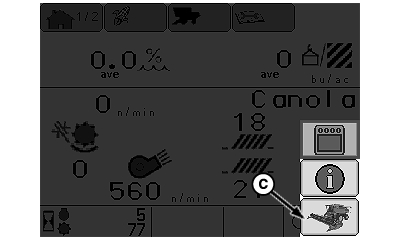
C - Combine Main Page Icon
D - Confirm Switch
Press main menu switch (A) and rotate selection dial (B) until combine main page icon (C) is highlighted.Press confirm switch (D).
CommandCenter display home page will appear.
|
OUO6075,00009C9-19-20070330 |