Service Intervals—Clearing or Delaying
 CAUTION:
H87194-UN-11JAN07
H86924-UN-10JAN07
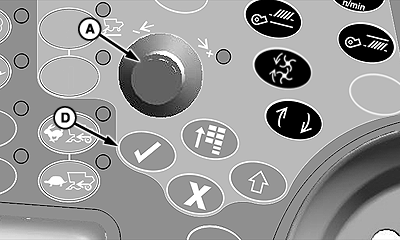
A - Selection Dial
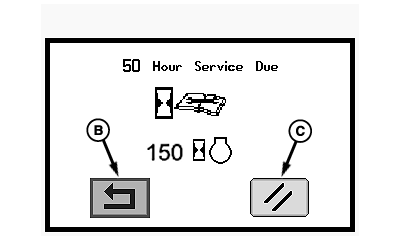
B - Return/Back Icon
C - Clear Icon
D - Confirm Switch
To prevent injury, never lubricate or service machine, header, or engine while it is running. Shut OFF engine, set parking brake and remove key.IMPORTANT: Service times are for average conditions. Service more often if machine is used in extreme conditions.
NOTE: See Break-In Service section for information on Service Intervals for First 100 Hours of Machine Operation.
Use service screen on CommandCenter display as a guide to servicing the machine.
Service screen will appear every 50 hours of engine operation, indicating the machine needs to be serviced.
When service screen appears, two choices can be selected:
- Operator can choose to ignore servicing the machine at this time.
- Operator can choose to service the machine at this time.
NOTE: If operator selects the return/back icon ignoring servicing the machine at this time the screen will disappear. The next time the key switch is turned to the “RUN” position the screen will appear.
Rotate selection dial (A) until return/back icon (B) or clear icon (C) is highlighted and press confirm switch (D).
NOTE: To reset service hours, refer to Calibration Procedures section for more information.
|
OUO6075,0000A4C-19-20090331 |