Harvest Smart Feed Rate—Capacity Mode
NOTE: Capacity mode should only be used when VisionTrak loss monitor is not reliable (sensors matting over with crop material).
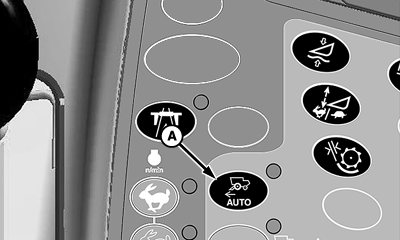
H86967-UN-20NOV06
A - Harvest Smart Feed Rate Enable Switch
Press Harvest Smart feed rate enable switch (A) until capacity mode is shown on CommandCenter display.
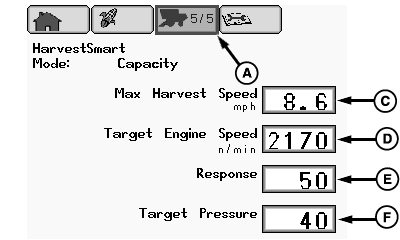
H87099-UN-23JAN07
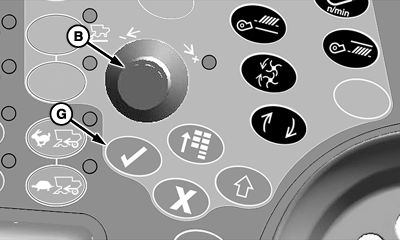
H87101-UN-14DEC06
A - Setup Pages Icon
B - Selection Dial
C - Max Ground Speed
D - Engine RPM
E - Response
F - Target Pressure
G - Confirm Switch
Capacity Mode: maintains a constant material flow allowing machine to increase ground speed when crop materials are lighter and decrease ground speed when crop material are heavier. Capacity mode does not adjust VisionTrak loss monitor settings, since mode is only maintaining a constant material flow.From setup pages icon (A), rotate selection dial (B) until one of the following is highlighted:
- Max Ground Speed (C) - sets maximum allowable ground speed for Harvest Smart to travel. System will not exceed setting, regardless of crop volume.
- Engine RPM (D) - sets minimum engine rpm (default 2170 rpm) level at which Harvest Smart is allowed to operate at.
- Response (E) - sets aggressiveness of Harvest Smart response to crop density changes. High response settings cause machine to make abrupt changes to ground speed maintaining crop volume. Low response settings cause machine to make less aggressive changes.
- Target Pressure (F) - allows operator to adjust target volume without changing VisionTrak loss monitor settings. Target volume measures amount of material entering separator by monitoring rotor pressure.
When desired box is highlighted, press confirm switch (G).
Rotate selection dial until desired values are shown. Press confirm switch to save value.
|
OUO6075,0000A7E-19-20070426 |