User Interface Module (UIM)
NOTE: User interface module (UIM) controls the navigation on the CommandCenter display or GreenStar display.
H86938-UN-20NOV06
H86231-UN-10JAN07
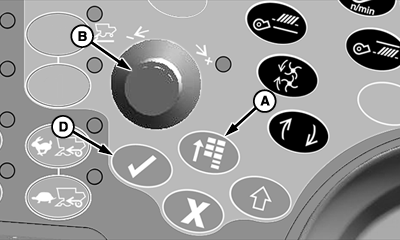
A - Main Menu Switch
B - Selection Dial
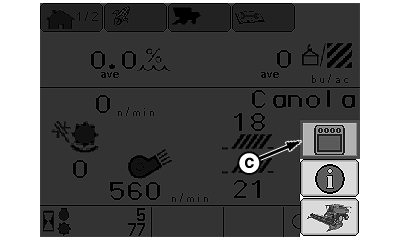
C - Display Settings Icon
D - Confirm Switch
Press main menu switch (A) and rotate selection dial (B) until display settings icon (C) is highlighted.Press confirm switch (D).
H87508-UN-26FEB07
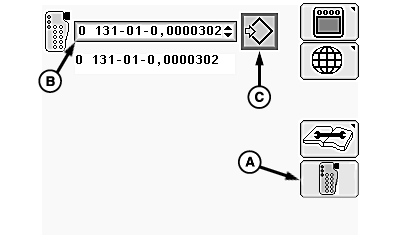
A - User Interface Module Icon
B - User Interface Module Menu
C - Enter/Accept Icon
Rotate selection dial until user interface module icon (A) is highlighted and press confirm switch.Rotate dial until user interface module menu (B) is highlighted and press confirm switch.
IMPORTANT: Only select 0 131-01-0,XXXXXXX from menu. All others are not recommended.
NOTE: Changing settings will change what controls the navigation on CommandCenter display and GreenStar display. Changes make certain functions (i.e. selection dial, confirm switch, cancel switch, main menu switch) not work correctly.
Rotate selection dial to select:
-
None - Searches for available user interface module (UIM) (not
recommended).
-
Disabled - display uses five buttons on display as a user interface
module (UIM) (not recommended).
-
0 131-01-0,XXXXXXX - Factory default for CommandCenter display
(recommended method).
-
NOTE: Pressing display select switch (if activated, see your
John Deere dealer) navigates between CommandCenter display and GreenStar
display (if equipped).
0 131-02-0,XXXXXXX - Recommend for GreenStar display navigation (change user interface module (UIM) setting on GreenStar). Not recommended for CommandCenter.
Once desired selection is highlighted, press confirm switch.
Rotate selection dial until enter/accept icon (C) is highlighted and press confirm switch.
H86938-UN-20NOV06
H86236-UN-10JAN07
A - Main Menu Switch
B - Selection Dial
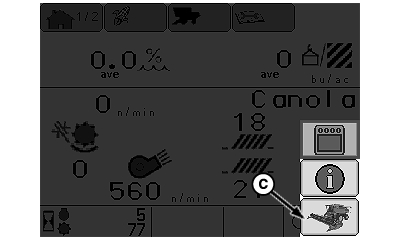
C - Combine Main Page Icon
D - Confirm Switch
Press main menu switch (A) and rotate selection dial (B) until combine main page icon (C) is highlighted.Press confirm switch (D).
CommandCenter display home page will appear.
|
OUO6075,0000AC3-19-20070713 |