Operator Interface Controls
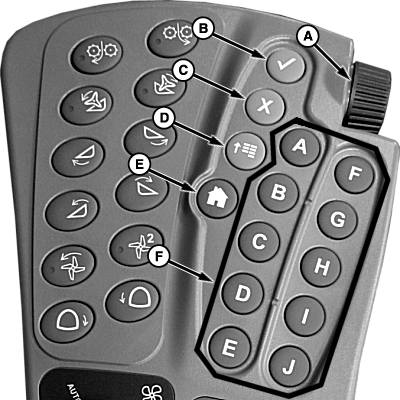
T8T539-UN-03JUN14
A - Selection Dial
B - Confirm Switch
C - Cancel Switch
D - Main Menu Switch
E - Home Switch
-
Selection Dial (A): allows operator
to move the ”focus” from item to item on the CommandCenter
display. As item is highlighted, a ”tool tip” appears
describing what the highlighted object is. Selection dial is also
used for data entry to increase or decrease numeric values.
- Rotating selection dial forward raises input box values.
- Rotating selection dial wheel rearward lowers input box values.
- Confirm Switch (B): allows operator to select desired ”focus” area on CommandCenter display or to confirm a highlighted action.
- Cancel Switch (C): allows operator to cancel or deselect an action on the display at anytime.
-
Main Menu Switch (D): is used to change
the active ”application” that the CommandCenter display
is running. Items or applications, in the menu included:
- Sugarcane
- Message Center
- GreenStar
- Display
- Layout Manager
- Access Manager
- Video
- Home Switch (E): allows operator to return to home page.
- Shortcut Switches (F): allows operator to select corresponding softkey on GreenStar™ display.
|
GreenStar is a trademark of Deere & Company |
WM05597,0000FA1-19-20150112 |