Armrest Display Navigation (GreenStar™ 3 2630 Display)
NOTE:
T8T557-UN-12JUN14
T8T780-UN-20JAN15
There are three methods of navigating around display screens.
Selection Dial and Confirm Switch Method:
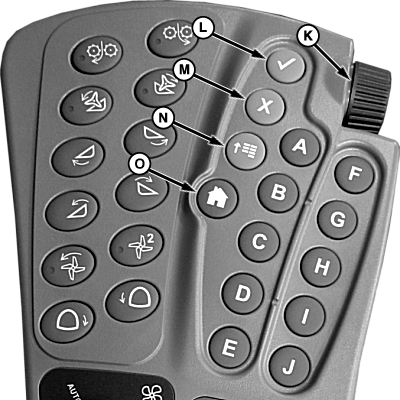
Use selection dial (K) to highlight desired softkeys (A—J).
Once desired softkey is highlighted, use the following dial and switches:
-
Selection Dial (K): Rotate dial to:
- Scroll through available items on selected page
- Increase or decrease values in a selected item
-
Confirm Switch (L): Once available
item is selected, use selection dial and press switch to:
- Select item
- Toggle between available selections within item
- Enter/Save values
- Cancel Switch (M): Press switch to cancel current selection.
Shortcut Switch Method:
Shortcut switches (A—J) allow a one-touch selection of desired input field or corresponding item on display.
- Shortcut Switches (A—J): Press to select corresponding softkey on armrest display.
Touchscreen Method:
IMPORTANT: Under no circumstance should touchscreen be contacted with an object harder or sharper than a fingertip (pen, pencil point, or any metal objects) that could cause damage to screen. Heavy pressure damages underlying components and voids warranty. Light amounts of pressure, if exerted continuously, can degrade touchscreen reliability.
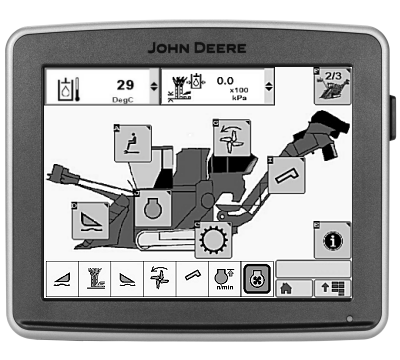
- Select and touch desired softkey on display.
Navigational Switches:
-
Main Menu Switch (N): Press switch
to change active application that display is running. Applications
include:
- Sugarcane
- Starfire 3000
- Engine
- Message Center
- Performance Monitor
- GreenStar™
- Original GreenStar™ Monitor
- Display
- Layout Manager
- Access Manager
- Video
- Calculator
- Home Switch (O): Displays user-defined home screen. If multiple screens are defined, pressing home switch multiple times toggles through each defined home screen.
|
GreenStar is a trademark of Deere & Company |
WM05597,0001121-19-20141216 |