Accessing Diagnostic Trouble Code Menu
T8120001781-UN-09OCT12
Main Menu Softkey (Display) / Main Menu Switch (Armrest)
H95846-UN-31MAR10
Message Center
Application Softkey
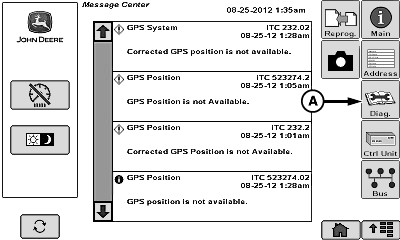
Select message center softkey.
T8130001513-UN-30APR13
A - Trouble Codes Softkey
Select trouble codes softkey (A).
T8130001514-UN-30APR13
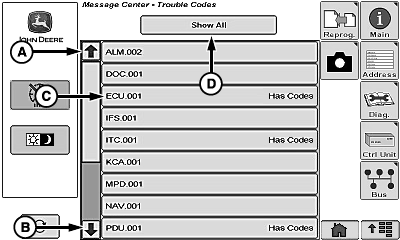
A - Up Arrow
B - Down Arrow
C - Control Unit
D - Show All Menu
Select up arrow (A) or down arrow (B) to scroll through control unit list.Select desired control unit (C).
NOTE: Another way to display diagnostic trouble codes is with show all menu (D). Select show all menu. This displays all trouble codes for all control units.
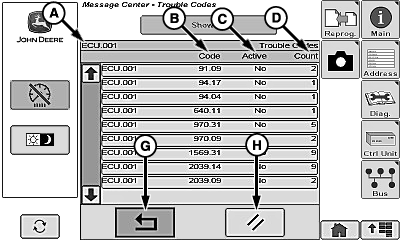
T8130001515-UN-30APR13
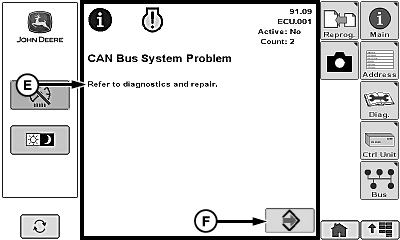
T8130001516-UN-30APR13
A - Control Unit
B - Trouble Code
C - Active (Yes or No)
D - Count
E - Code Description
F - Accept Softkey
G - Return Softkey
H - Clear Softkey
NOTE: Select up arrow or down arrow to scroll through trouble codes if multiple codes are displayed.
Screen displays the following:
- Control Unit (A)
- Trouble Code (B)
- Active (Yes or No) (C)
- Count (D)
Select desired code.
Code description (E) appears and gives more detail of trouble code.
Select accept softkey (F) to return to previous screen.
Select return softkey (G) to return to previous screen or until clear softkey (H) is displayed.
|
WM05597,000113A-19-20141114 |