Remove and Install Primary Extractor Fan Blades
 CAUTION:
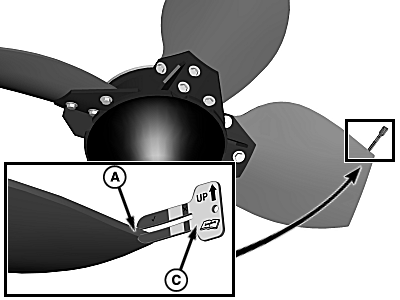
T8T2929-UN-12AUG15
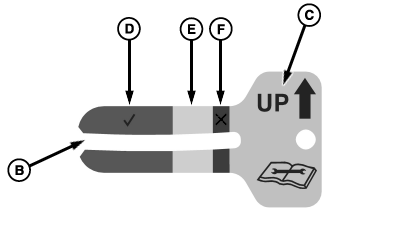
T8T2898-UN-22JUL15
A - Location
B - Opening
C - Gauge
D - Green Area
E - Yellow Area
F - Red Area
Avoid possible serious injury or death. Set park brake, shut OFF engine, wait for harvesting functions to stop completely, remove key, and turn OFF battery disconnect switch before servicing primary extractor.IMPORTANT: When replacing extractor blades, always use John Deere blades.
Always replace blades as a complete set. Do not install new blades with used blades.
Replace primary extractor blades when one blade has worn below minimum thickness.
-
Set park brake, shut OFF engine, wait for harvesting functions to stop completely, remove key, and shut OFF battery disconnect switch.
-
NOTE: Arrow on gauge must point up.
Place opening (B) of supplied gauge (C) over blade at location (A) on all four blades.
-
Blade life is determined by how far gauge goes over blade.
|
Green Area (D) |
Blades are in good condition. No replacement needed. |
|
Yellow Area (E) |
Blades are in acceptable condition. Replacement needed soon. |
|
Red Area (F) |
Blades are fully worn. Replace blades now. |
-
CAUTION:
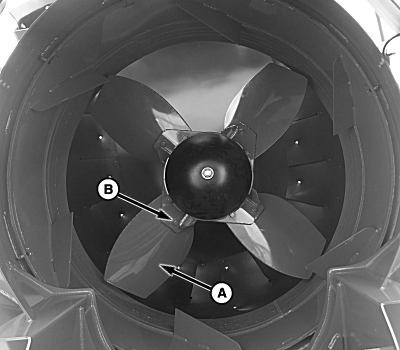
T8T2930-UN-13AUG15A - Fan Blade (4 used)
B - Hardware (16 used)
Avoid possible serious injury or death. Set park brake, shut OFF engine, wait for harvesting functions to stop completely, remove key, and turn OFF battery disconnect switch before servicing primary extractor.IMPORTANT: Always replace blades as a complete set. Do not install new blades with used blades.
Park machine on flat, level surface. Set park brake, shut OFF engine, shut OFF battery disconnect switch, and remove key.
-
Clean primary extractor fan and surrounding area.
-
Remove and retain cap screws (B) and fan blades (A).
-
IMPORTANT: Apply Thread Lock and Sealer (High Strength) to threads of cap screws before installing.
Install new fan blades and retain with previously removed cap screws.
-
Verify that fan blades do not contact extractor housing when rotated by hand.
-
Check fan operation. See Start Up Procedure After Extractor Blade Replacement in this section.
|
WM05597,0001384-19-20150813 |