Floating Crop Dividers and Contour Base Cutter Height Control (If Equipped)
Set Point and Enable Settings (If Equipped)

T8T1881-UN-21JAN15
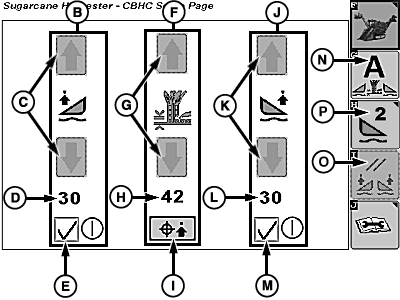
T8T2943-UN-01SEP15
Allows operator to access Floating Crop Dividers and Contour Base Cutter Height Control settings.
Left-Hand Floating Crop Divider Settings (B)
Allows operator to change and view set point and enable float for left-hand crop divider.
Left-Hand Floating Crop Divider Increase and Decrease Softkeys (C)
Allows operator to increase or decrease left-hand floating crop divider set point. The softkey is backlit green and allows the set point to be modified when conditions to enable floating crop divider for left-hand crop divider have been satisfied and gray when conditions have not been met.
NOTE: A single touch is slow advance. A touch and hold is quick advance.
Left-Hand Floating Crop Divider Set Point (D)
Displays set point for left-hand floating crop divider.
NOTE: Each crop divider may be set to different set points.
Left-Hand Floating Crop Divider On-Off (E)
Allows operator to enable floating option on left-hand crop divider.
Contour Base Cutter Height Control Settings (F)
Allows operator to change, view, and capture target height set point for contour base cutter height control.
Contour Base Cutter Height Control Increase and Decrease Softkeys (G)
Allows operator to increase or decrease base cutter position set point. The softkey is backlit green and allows the set point to be modified when conditions to enable the contour base cutter height control system have been satisfied and gray when conditions have not been met.
NOTE: A single touch is slow advance. A touch and hold is quick advance.
Contour Base Cutter Height Control Set Point (H)
Displays set point for contour base cutter height control position.
Contour Base Cutter Height Control Target Capture (I)
Allows the operator to capture and store the current base cutter height as the new set point for the contour base cutter height control system. If desired and actual base cutter values are off, push and hold softkey for two sec. on consistent ground to calibrate and sync target to current position. If calibration is successful, a confirmation alarm sounds. To calibrate, Floating Crop Dividers must be active and machine must be moving forward. For more information, see Calibrate System in Floating Crop Divider and Contour Base Cutter Height Control (If Equipped) section.
Right-Hand Floating Crop Divider Settings (J)
Allows operator to change and view set point and enable float for right-hand crop divider.
Right-Hand Floating Crop Divider Increase and Decrease Softkeys (K)
Allows operator to increase or decrease right-hand floating crop divider set point. The softkey is backlit green and allows the set point to be modified when conditions to enable floating crop divider for right-hand crop divider have been satisfied and gray when conditions have not been met.
NOTE: A single touch is slow advance. A touch and hold is quick advance.
Right-Hand Floating Crop Divider Set Point (L)
Displays set point for right-hand floating crop divider.
NOTE: Each crop divider may be set to different set points.
Right-Hand Floating Crop Divider On-Off (M)
Allows operator to enable floating option on right-hand crop divider.
Activate All Softkey (N)
Allows the operator to activate the floating crop divider and contour base cutter control height control systems with the touch of a button when all enabling conditions have been met.
Floating Crop Divider Reset Softkey (O)
Resets floating crop divider pressure percentage to 50%.
End of Row Setup Softkey (P)
Allows operator to access end of row settings for Floating Crop Dividers and Contour Base Cutter Height Control.
End of Row Setup (If Equipped)

T8T2945-UN-01SEP15
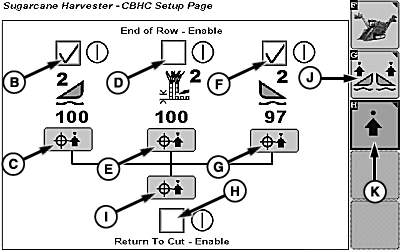
T8T2944-UN-01SEP15
Allows operator to access end of row settings for Floating Crop Dividers and Contour Base Cutter Height Control.
Left-Hand Crop Divider End of Row Enable (B)
Allows operator to enable left-hand crop divider end of row option.
Left-Hand Crop Divider End of Row Set Point Capture Softkey (C)
Allows operator to touch and hold softkey to change left-hand crop divider end of row set point to current position.
Contour Base Cutter End of Row Enable (D)
Allows operator to enable base cutter end of row option.
Contour Base Cutter End of Row Set Point Capture Softkey (E)
Allows operator to touch and hold softkey to change base cutter end of row set point to current position.
Right-Hand Crop Divider End of Row Enable (F)
Allows operator to enable right-hand crop divider end of row option.
Right-Hand Crop Divider End of Row Set Point Capture Softkey (G)
Allows operator to touch and hold softkey to change right-hand crop divider end of row set point to current position.
Contour Base Cutter Return to Cut Enable (H)
NOTE: This must be checked for Contour Base Cutter Height Control to work.
Allows operator to enable base cutter return to cut option.
This target is identical to base cutter set point displayed on cornerpost display.
End of Row Set Point Capture All Softkey (I)
Allows operator to touch and hold softkey to change base cutter and left-hand and right-hand crop dividers end of row set point to current position.
Floating Crop Dividers and Contour Base Cutter Height Control Setup Softkey (J)
Allows operator to return to Floating Crop Dividers and Contour Base Cutter Height Control settings.
Advanced Setup (K)
Allows operator to access sensitivity settings for Floating Crop Dividers and Contour Base Cutter Height Control.
Advanced Setup (If Equipped)
IMPORTANT:
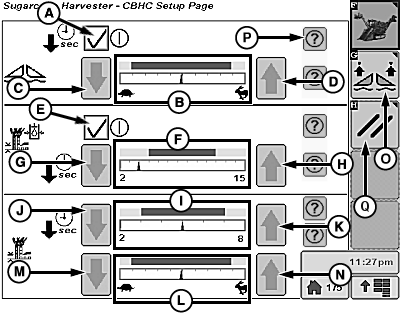
T8T2804-UN-15JUN15
Floating Crop Divider Resume Enable Box (A)
Allow operator to enable (checkmark) or disable (no checkmark) resume function of floating crop dividers after they have been manually raised. Crop divider will resume float function after five sec. when enabled.
Floating Crop Dividers Sensitivity Meter (B)
Displays sensitivity for right-hand and left-hand floating crop dividers.
Floating Crop Dividers Sensitivity Decrease Softkey (C)
Allows operator to decrease floating crop dividers sensitivity.
Floating Crop Dividers Sensitivity Increase Softkey (D)
Allows operator to increase floating crop dividers sensitivity.
Base Cutter Pressure Target Range Enable Box (E)
Allows operator to enable (checkmark) or disable (no checkmark) base cutter pressure target range. Contour base cutter height control system operates off position only when disabled.
Base Cutter Pressure Resume Timer Meter (F)
Displays time in seconds before system attempts to reacquire target position when enabled. Adjustable 5—15 sec.
NOTE: Default time is 10 sec.
Base Cutter Pressure Resume Timer Decrease Softkey (G)
Allows operator to decrease time before system attempts to reacquire target position.
Base Cutter Pressure Resume Timer Increase Softkey (H)
Allows operator to increase time before system attempts to reacquire target position.
Base Cutter Position Resume Timer Meter (I)
Displays time in seconds before base cutter will reacquire target position after being manually raised or lowered. Adjustable 2—8 sec.
NOTE: Default time is 5 sec.
Base Cutter Position Resume Timer Decrease Softkey (J)
Allows operator to decrease time before system reacquires target position.
Base Cutter Position Resume Timer Increase Softkey (K)
Allows operator to increase time before system reacquires target position.
Contour Base Cutter Height Sensitivity Meter (L)
Displays base cutter height sensitivity to changes in the position of floating crop dividers.
Contour Base Cutter Height Sensitivity Decrease Softkey (M)
Allows operator to decrease base cutter height sensitivity.
Contour Base Cutter Height Sensitivity Increase Softkey (N)
Allows operator to increase base cutter height sensitivity.
Floating Crop Dividers and Contour Base Cutter Height Control Setup Softkey (O)
Allows operator to return to Floating Crop Dividers and Contour Base Cutter Height Control settings.
Information Softkey (P)
Allows operator to access additional information for desired setting.
Advanced Setup Reset Softkey (Q)
Resets advanced settings to defaults.
|
WM05597,000139C-19-20150901 |