Elevator Screen
T8T1301-UN-03OCT14
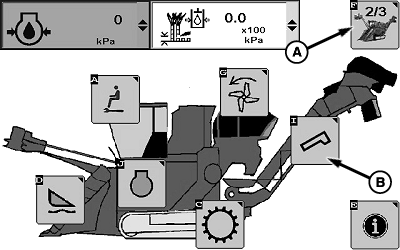
Sugarcane Main Page 2 Of 3
T8T2941-UN-01SEP15
A - Sugar Main Softkey
B - Elevator Setup Softkey
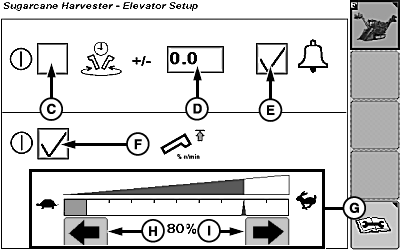
C - Checkbox
D - Elevator Swing Control Offset
E - Checkbox
F - Checkbox
G - Reduced Elevator Speed Graph
H - Decrease Elevator Speed Softkey
I - Increase Elevator Speed Softkey
Select sugar main softkey (A) until sugarcane main page 2 of 3 is displayed as shown.Select elevator setup softkey (B) to access setup page.
Elevator Swing Control
Select check box (C) to enable elevator swing control.
Select elevator swing control offset (D) to adjust the default elevator swing control.
- The default elevator swing control is approximately 1/4 of a turn.
-
The elevator swing control offset may be adjusted (+) or (-)
by selecting the corresponding softkey.
Adjusting the offset with the (+) softkey increases distance the elevator swings. Adjusting the offset with the (-) softkey decreases distance the elevator swings.
NOTE: Elevator swing control has a range of -3.0—3.0.
Select checkbox (E) to enable an audible alert when elevator swing control is occurring.
To perform an elevator swing:
- Base cutter must be engaged in forward direction.
- Checkbox (C) must be marked.
- Press desired elevator swing switch on multi-function lever twice (double-click) to perform an elevator swing.
Reduced Elevator Speed Mode (If Equipped)
Select checkbox (F) to activate reduced elevator speed mode.
Select reduced elevator speed graph (G) to adjust elevator speed.
NOTE: Elevator speed is modified by selecting plus (+) or minus (-) softkey on screen or selecting decrease or increase elevator speed softkey (H or I).
A single select is slow advance. A select and hold is quick advance.
|
WM05597,000139F-19-20150901 |