Set End of Row Heights
-
T8T560-UN-13JUN14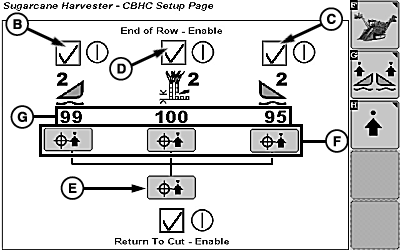
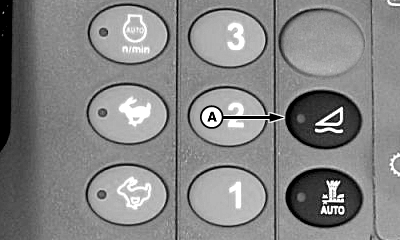
T8T2949-UN-01SEP15A - Switch
B - Left-Hand Crop Divider End Of Row Enable Box
C - Right-Hand Crop Divider End Of Row Enable Box
D - Base Cutter End Of Row Enable Box
E - End Of Row Set Point Capture All Softkey
F - End Of Row Set Point Capture Softkeys (3 used)
G - End Of Row Set Points (3 used)
Press switch (A) to disable floating crop dividers. -
NOTE: Operator may enable end of row for left-hand crop divider, right-hand crop divider, base cutter, or all.
Corresponding end of row enable boxes (B—D) must display checkmarks within armrest display.
-
Raise or lower base cutter, left-hand crop divider, and right-hand crop divider to desired height for headland travel.
-
Select end of row set point capture all softkey (E) or corresponding end of row set point capture icon (F) to capture current position as end of row set point.
-
Current end of row set point (G) is displayed.
NOTE: Crop divider positions do not have to match exactly.
|
WM05597,00013A1-19-20150901 |