Operate Contour Base Cutter Height Control System
T8T561-UN-13JUN14
T8T2947-UN-01SEP15
T8T1908-UN-27JAN15
T8T2951-UN-01SEP15
T8T1898-UN-22JAN15
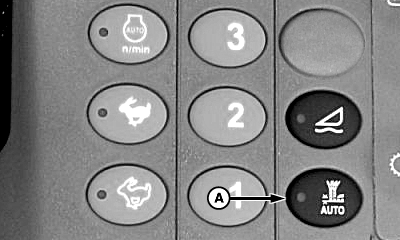
A - Switch
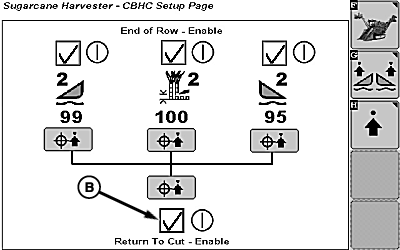
B - Return To Cut Enable Box
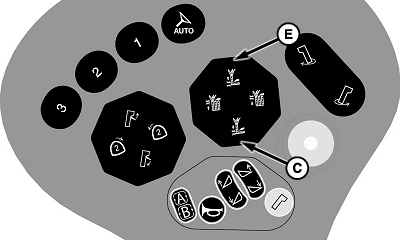
C - Base Cutter Down Switch
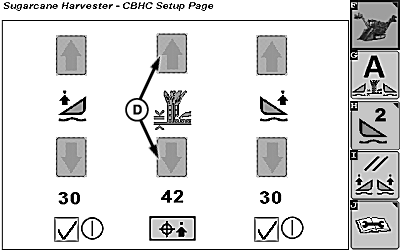
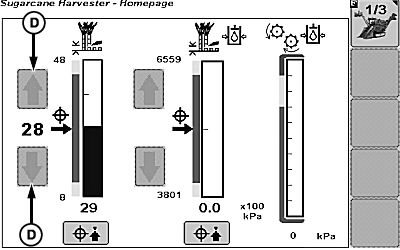
D - Contour Base Cutter Height Control Increase and Decrease Softkeys
E - Base Cutter Up Switch
To turn ON Contour Base Cutter Height Control system:-
Press switch (A) to enable or disable Contour Base Cutter Height Control.
-
Return to cut enable box (B) must display checkmark within armrest display.
-
Turn OFF park brake switch and position harvester at beginning of row.
-
Engage harvesting functions in forward motion.
-
Verify that multi-function lever is in neutral or forward position.
-
NOTE: Floating Crop Dividers system must be active in order to activate Contour Base Cutter Height Control system.
Press base cutter down switch (C) once (single-click) to activate contour base cutter height control.
-
To adjust height target, press contour base cutter height control increase or decrease softkeys (D).
To turn OFF Contour Base Cutter Height Control system: Press base cutter up switch (E) twice (double-click) to deactivate system and activate end of row function.
A single click and hold of base cutter up switch manually raises the base cutter. After five seconds, the base cutter resumes float.
To turn OFF contour base cutter height control system, turn off contour base cutter switch (A) or floating crop dividers switch.
|
WM05597,00013A3-19-20150901 |