Download Harvester Activity Monitor Data
T8T1879-UN-16JAN15
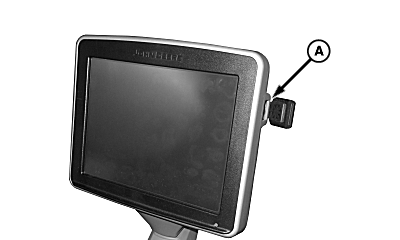
A - USB Port
Harvester activity monitor logs data to a universal serial bus (USB) drive as long as it is connected to USB port (A).NOTE:
- Harvester activity monitor data is saved in a .csv file that opens in a spreadsheet.
- When key is cycled, it makes a new line of data in the .csv file.
- If USB drive is not connected when the machine is started, then the data log is one set of data when USB drive is connected.
Harvester Activity Monitor data included in .csv file:
- Index
- Date
- Time
- Shift number
- User ID
- GPS Latitude
- GPS Longitude
- Area Harvested (hectares)
- Fuel Level %
- Harvesting Distance (km)
- Maneuvering Distance (km)
- Transport Distance (km)
- Fuel consumed Harvesting (L)
- Fuel consumed Maneuvering (L)
- Fuel consumed Transporting (L)
- Fuel consumed Waiting (L)
- Harvesting Time Hours
- Headland Maneuver Time Hours
- Transport Time Hours
- Waiting Time Hours
- Off Time Hours
- AutoTrac™ Hours
- Floating Crop Divider Hours
- Contour Base Cutter Height Control Hours
- Automatic FieldCruise™ Hours
- FieldCruise™ Hours
- Stop Diagnostic Trouble Code Counts
- Derate Diagnostic Trouble Code Counts
-
IMPORTANT: The two USB connections in the display are meant for data transfer and reprogramming only. Do not use them for charging or any other purpose.
NOTE: Universal serial bus (USB) drive must be formatted in FAT32 filesystem.
Connect a universal serial bus (USB) drive to USB port (A).
-
T8T2555-UN-18MAY15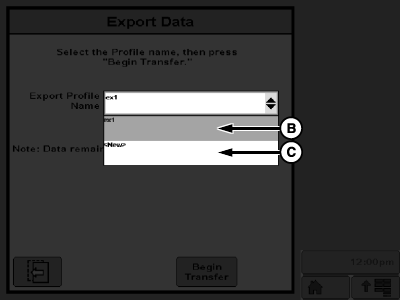
T8T2556-UN-18MAY15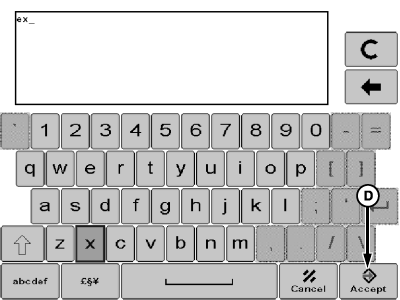
T8T2557-UN-18MAY15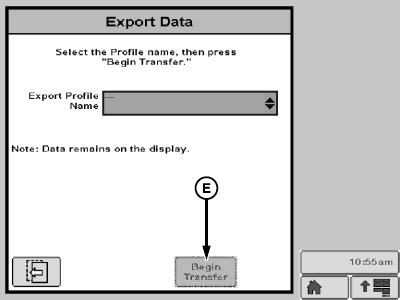
T8T2558-UN-18MAY15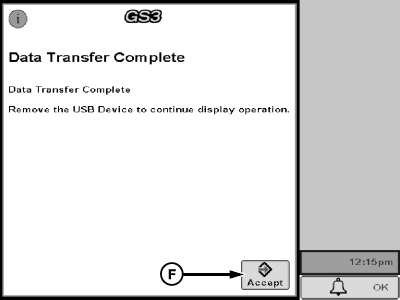
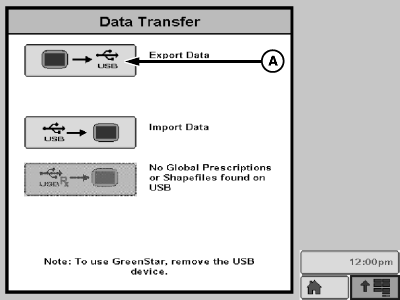
T8T2559-UN-18MAY15A - Export Data Softkey
B - Current Profile
C - New Profile
D - Accept Softkey
E - Begin Transfer Softkey
F - Accept Softkey
Select export data softkey (A). -
Select a current profile (B) or create a new profile (C).
-
If applicable, use on-screen keyboard to type a profile name and select accept softkey (D).
-
Select begin transfer softkey (E). Select accept softkey (F).
|
AutoTrac is a trademark of Deere & Company FieldCruise is a trademark of Deere & Company |
WM05597,00013F5-19-20151209 |