Engine Setup Screen
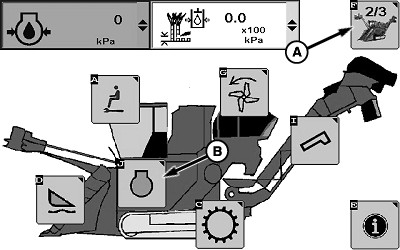
T8T671-UN-03OCT14
Sugarcane Main Page 2 Of 3
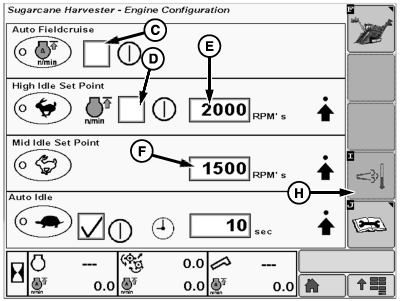
T8T4785-UN-07SEP16
Engine Configuration Screen
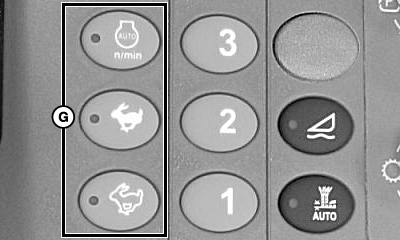
T8T2806-UN-16JUN15
A - Sugar Main Softkey
B - Engine Information Softkey
C - Checkbox
D - Checkbox
E - Manual FieldCruise™ Set Point
F - Mid Idle Set Point
G - Engine Speed Switches (3 used)
H - Not Used
Automatic FieldCruise™ keeps engine speed at 2000 rpm until the harvester needs more power. When power is needed, the engine speed is increased to 2210 rpm. Engine speed is automatically increased and decreased as needed.-
Select sugar main softkey (A) until sugarcane main page 2 of 3 is displayed as shown.
-
Select engine information softkey (B).
-
Select checkbox (C) to enable Automatic FieldCruise™.
-
Select checkbox (D) to enable Manual FieldCruise™.
NOTE: Set point is modified by selecting (+) or (-) softkey on screen.
-
Select Manual FieldCruise™ set point (E) to modify.
-
Select mid idle set point (F) to modify.
-
Press corresponding engine speed switch (G) to engage desired engine speed.
NOTE: If checkboxes (C and D) are both checked, operator can toggle between Automatic FieldCruise™ and Manual FieldCruise™ using engine speed switches (G).
Auto Idle
-
NOTE:
T8T671-UN-03OCT14Sugarcane Main Page 2 Of 3
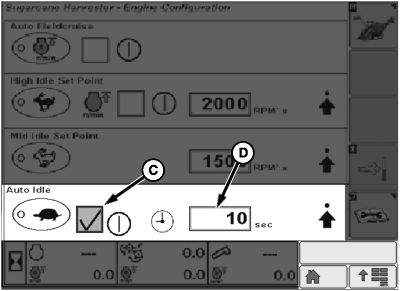
T8T4784-UN-07SEP16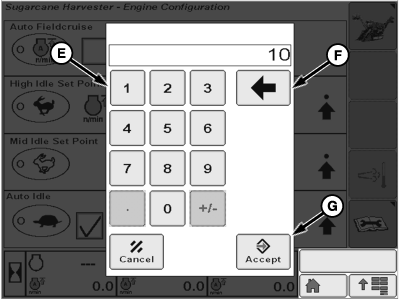
T8T4626-UN-10AUG16A - Sugar Main Softkey
B - Engine Information Softkey
C - Enable Auto Idle Softkey
D - Auto Idle Timer Softkey
E - Numeric Softkey
F - Delete Softkey
G - Accept Softkey
Auto idle reduces engine rpm when the multi-function lever is placed in the neutral position. Auto idle must be turned on and the timer set.Select the sugar main softkey (A) until the sugar cane main page 2/3 is displayed as shown.
-
Select the engine information softkey (B).
-
Select the enable auto idle softkey (C). Checkmark appears when activated.
-
Select the auto idle timer softkey (D).
-
The numerical keypad is displayed. Select the auto idle activation time in seconds from the numeric softkeys (E).
NOTE: Selectable range is 0--200 s.
-
If an incorrect number is entered, use the delete softkey (F) to delete the selection.
-
When the correct value is entered, press the accept softkey (G).
-
NOTE: When machine is in neutral or the parking brake is engaged, the engine will enter a low idle after the specified dwell time.
When the parking brake is disengaged and the multi-function lever moved to the forward or reverse position, the engine rpm is automatically increased to previous speed.
The screen returns to the engine configuration screen, and the auto idle selected value is displayed.
NOTE: Settings can be locked to avoid any alterations by the operator.
|
FieldCruise is a trademark of Deere & Company |
AS09261,00000C8-19-20161017 |