Display Navigation Layouts
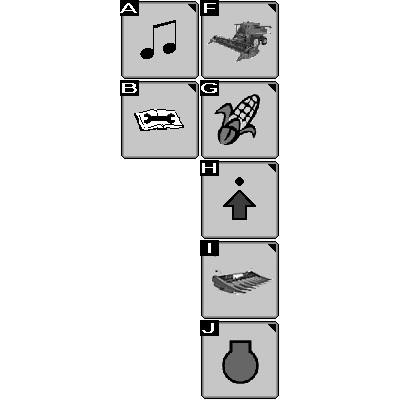
H95608-UN-30APR10
|
Not used (A) |
|
Diagnostic and Calibrations (B) |
|
Combine Main (F) |
|
Harvesting Information (G) 1 |
|
Combine Setup (H) |
|
Header Setup (I) 2 |
|
Engine Information (J) |
Touch or press confirm switch when desired icon is highlighted to advance to next display screen. See following information for further screen navigation.
Diagnostic and Calibrations
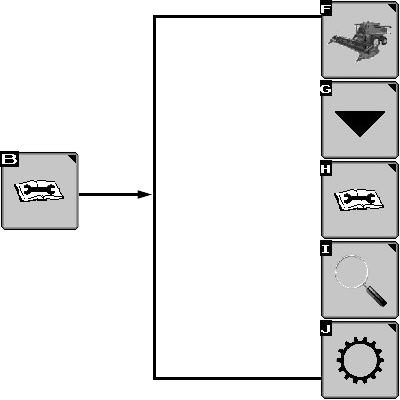
H95605-UN-05MAR10
|
Diagnostic and Calibrations (B) |
||
|
Icon (F) |
Icon (G) |
Icon (H) |
|
Combine Main |
Calibrations |
Diagnostic Readings |
|
Icon (I) |
Icon (J) 3 |
|
|
Special Tests |
Tow Mode Setup |
|
Touch or press confirm switch when desired icon is highlighted to advance to next display screen. See following information for further screen navigation.
Combine Main
NOTE:
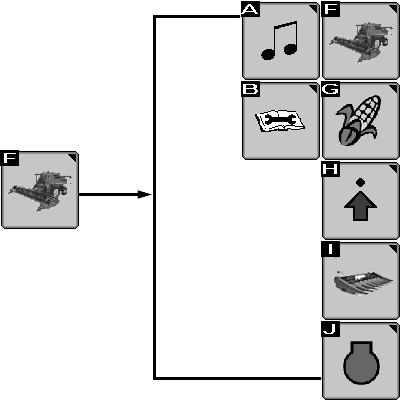
H95612-UN-30APR10
|
Combine Main (F) |
|
|
Icon (A) |
Not used |
|
Icon (B) |
Diagnostic and Calibrations |
|
Icon (F) |
Combine Main |
|
Icon (G) |
Harvesting Information 1 |
|
Icon (H) |
Combine Setup |
|
Icon (I) |
Header Setup 2 |
|
Icon (J) |
Engine Information |
Touch or press confirm switch when desired icon is highlighted to advance to next display screen. See following information for further screen navigation.
Harvesting Information

H95601-UN-04OCT10
|
Harvesting Information (G) 1 |
|
|
Icon (F) |
Icon (G) |
|
Combine Main |
Yield Information |
|
Moisture Information |
|
|
Change Cut Width/Rows4 |
|
|
Icon (I)5 |
Icon (J)5 |
|
Field Totals |
Crop Totals |
Touch or press confirm switch when desired icon is highlighted to advance to next display screen. See following information for further screen navigation.
Combine Setup
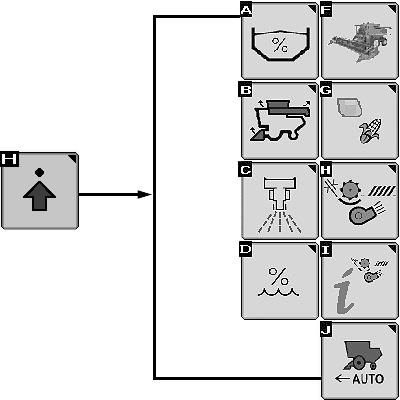
H105780-UN-05DEC12
|
Combine Setup (H) |
||
|
Icon (A) |
Icon (B) |
Icon (C) |
|
Grain Tank Level Setup |
Not Used |
Not Used |
|
Icon (D) |
Icon (F) |
Icon (G) |
|
Moisture Alarm |
Combine Main |
Crop Setup6 |
|
Moisture Correction (Offset) |
Grain Loss Calibration |
|
|
Yield Units |
Advanced Grain Loss Setup |
|
|
Icon (H) |
Icon (I) |
Icon (J) |
|
Automatic Combine Adjust Setup |
Interactive Combine Adjustment7 |
Harvest Smart™ Feed Rate Setup8 |
Touch or press confirm switch when desired icon is highlighted to advance to next display screen. See following information for further screen navigation.
Header Setup
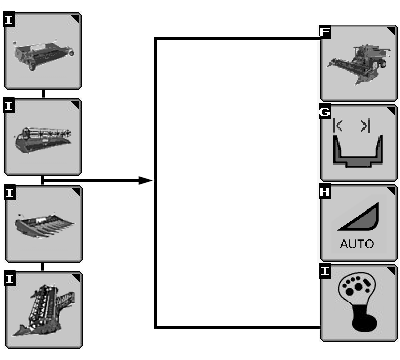
H109710-UN-28JAN14
|
Header Setup (I) 2 |
|
|
Icon (F) |
Icon (G) 2 |
|
Combine Main |
Header Width Setup |
|
Header Hours |
|
|
Record Stop Height |
|
|
Icon (H) |
Icon (I) |
|
Automatic Header Height Modes |
Multi-function Lever Setup 9 |
Touch or press confirm switch when desired icon is highlighted to advance to next display screen. See following information for further screen navigation.
Engine Information
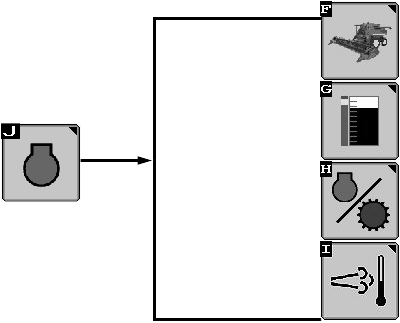
H108616-UN-26JUL13
|
Engine Information (J) |
|
|
Icon (F) |
Icon (G) |
|
Combine Main |
Engine and Separator Hours |
|
Power Meter |
|
|
Icon (H) |
Icon (I) |
|
Engine Speed Management10 |
Not Used |
Touch or press confirm switch when desired icon is highlighted to advance to next display screen. See following information for further screen navigation.
|
1 Icon switches
between corn and wheat based on type of header connected to machine.
|
DF67602,00002DA-19-20141107 |