Reconfigure Detail Machine Settings
NOTE:
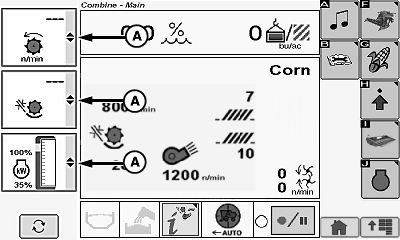
H109858-UN-14FEB14
A - Machine Setting Icons
Shows detailed machine settings. Allows operator to reconfigure screen and provides the ability to monitor three items at once. Items vary depending upon machine configuration.Touch or press confirm switch when desired machine setting icon (A) is highlighted.
Machine settings menu displays the following:
- Moisture
- Yield
- Cleaning Fan Speed
- Threshing Speed
- Threshing Clearance
- Chaffer Clearance
- Sieve Clearance
- Backshaft Speed
- CommandTouch™ Multi-Speed Feeder House Gear (If Equipped)
- Deck Plate Spacing
- Reel Speed
- Draper Speed
- Spreader Speed
- Harvested Weight Counter
- Productivity (Yield per hour)
- Grain Tank Level (%)
- Vehicle/Separator Hours
- Power Meter
- Hydraulic Feeder House Fore/Aft Tilt Position (If Equipped)
Touch or press confirm switch when desired machine setting is highlighted.
Repeat procedure on remaining menus as desired.
|
DF67602,0000388-19-20141107 |