Automatic Header Control (AHC) Settings
NOTE:
H96245-UN-03MAY10
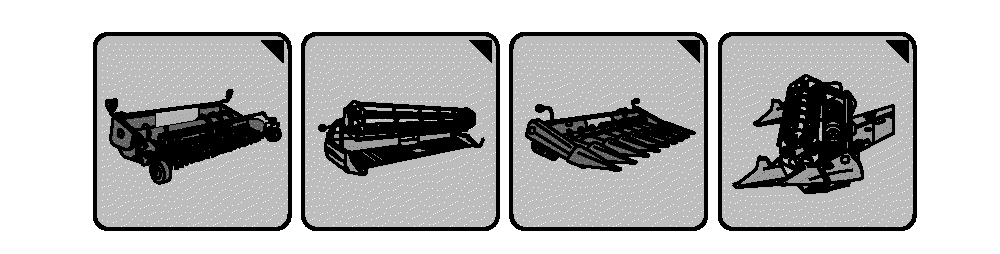
Header Setup Icons
H109796-UN-12FEB14
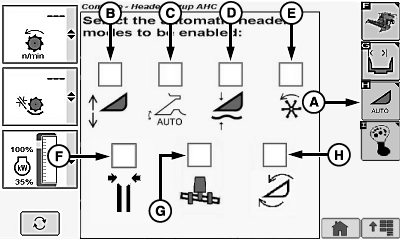
Corn Head Display
H109797-UN-12FEB14
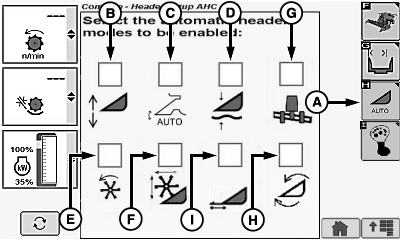
Platform Display
Header setup icon changes based on type of header connected to machine.Touch or press confirm switch when header setup icon is highlighted.
Touch or press confirm switch when automatic header height modes icon (A) is highlighted.
Touch or press confirm switch when one of the following is highlighted:
- Header Height Sensing Enable (B)
- Header Height Resume Enable (C)
- Active Header Float Enable (D)
- Dial-A-Speed™ Enable1 (E)
- Deck Plate Position Resume Enable2 (F)
- Lateral Tilt Enable3 (G)
- Hydraulic Feeder House Fore/Aft Tilt4 (H)
Corn Head
- Header Height Sensing Enable (B)
- Header Height Resume Enable (C)
- Active Header Float Enable (D)
- Dial-A-Speed™ Enable (E)
- Reel Position Resume Enable5 (F)
- Lateral Tilt Enable3 (G)
- Hydraulic Feeder House Fore/Aft Tilt4 (H)
Draper/Platform/Belt Pickup/Extendable Platform
Box displays a checkmark indicating which icons will be enabled or disabled displayed on cornerpost.
NOTE: If boxes are grayed out that option is not available on your machine.
|
Dial-A-Speed is a trademark of Deere & Company 1 If connected to a corn head with a reel. 2 If connected to a corn head with adjustable deck plates. 3 If equipped with Lateral Tilt. 4 If equipped with Hydraulic Feeder House Fore/Aft Tilt. 5 If connected to a platform machine with a reel. |
DF67602,0000389-19-20141107 |