Combine Setup Screen
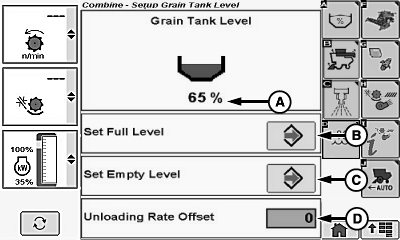
Grain Tank Level Settings:
NOTE:
H112956-UN-13FEB15
- Grain Tank Level Percentage (A)
- Save Icon (B) - Allows operator to save grain tank full level
- Save Icon (C) - Allows operator to save grain tank zero level
Unloading Rate Offset Settings:
NOTE: Allows operator to change calculated unloading rate offset values.
-
Unloading Rate Offset (D)
- Offset Rate (-15 to 15)
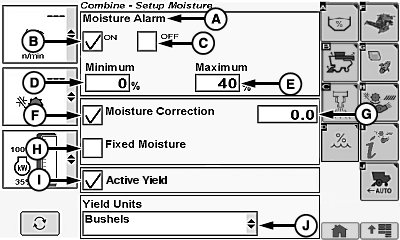
Moisture Settings:
NOTE:
H115522-UN-19AUG15
-
Moisture Alarm (A)
- ON (B)
- OFF (C)
- Minimum Alarm (1—50%) (D)
- Maximum Alarm (1—60%) (E)
-
Moisture Correction (-25.0 to 25.0, increments of 0.1) (F)
- Manual Offset Setting (G)
- Fixed Moisture (H)
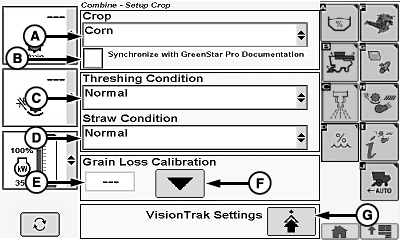
Crop Settings:
NOTE:
H112867-UN-09FEB15
H111418-UN-12JUN14
-
Crop (A)1
- Fixed List
- GreenStar™ Pro Documentation (B) - When checked it synchronizes selected crop from armrest display with display mounted on cornerpost (if equipped).
-
Threshing Condition (C)
- Fixed List
-
Straw/Cob Condition (D)
- Fixed List
Grain Loss Calibration:
-
Grain Loss Calibration
- Calibration Reference Number (E)
- Calibration Icon (F)
-
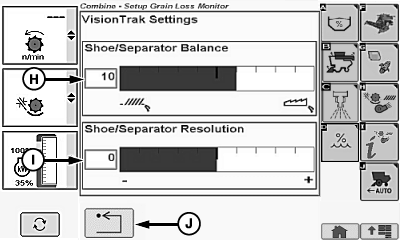
VisionTrak™ Settings Icon (G) - Allows operator to advance to next page to fine-tune
shoe/separator losses for selected crop
- Shoe/Separator Balance (-50, default is 0, 50) (H)
- Shoe/Separator Resolution (-50, default is 0, 50) (I)
- Return/Back Icon (J) - Allows operator to return to previous page
Machine Settings:
H109931-UN-28FEB14
-
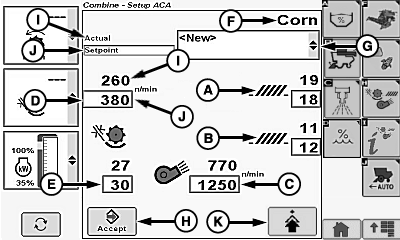
Automatic Combine Adjust (ACA) (Numeric Entry)
- Chaffer Position (A)
- Sieve Position (B)
- Fan Speed (C)
- Threshing Speed (D)
- Threshing Clearance (E)
- Harvested Crop (Viewable Only) (F)
-
Crop Modifiers (G)
- Default
- Dry (Default)
- Wet (Default)
- New
- Cleanout
-
Enter/Accept Icon (H) - allows modified machine settings chosen
by operator to automatically adjust and allows operator to save personal
machine settings
NOTE: Threshing speed and fan speed setpoint values flash until
separator is engaged and engine speed is above 2000 rpm.
Personalized machine settings will also be saved (settings will not overwrite factory settings) if new was chosen from crop modifiers menu.
- Actual (setpoint value in black) (I) - indicates current setpoint value of machine
-
Setpoint (setpoint value in blue) (J) - setpoint value automatically
increases or decreases when plus (+) or minus (-) symbol is touched
or selection dial is turned
NOTE: Machine automatically adjusts to operator setpoint value.
- Advanced Setup Icon (K) - allows operator to advance to next page to verify machine configuration settings for items outside of cab
Interactive Combine Adjustment (If Equipped) (Improvement Targets):
-
H108640-UN-29JUL13
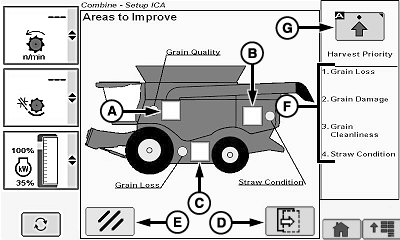
Areas to Improve - Allows operator to modify area of machine performance that is not satisfactory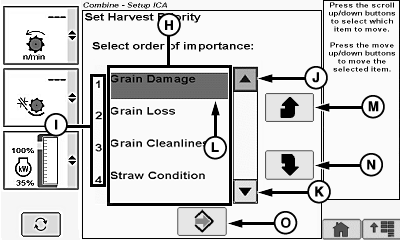
H108641-UN-29JUL13- Grain Quality (A)
- Straw Condition (B)
- Grain Loss (C)
- Next Page Icon (D) - Allows operator to advance to next page to fine-tune specific harvest issues
- Cancel Icon (E) - Allows operator to cancel interactive combine adjustment setup and return to combine main screen
- Harvest Priority Order (F) - Displays current order of harvest priority list
- Setup Harvest Priority Icon (G) - Allows operator to advance to next page to change order of harvest priority list
Interactive Combine Adjustment (If Equipped) (Harvest Priority Settings):
-
Harvest Priority List (H) - Allows operator to change preferences
of how machine is optimized
- Grain Loss
- Grain Damage
- Grain Cleanliness
- Straw Condition
-
Harvest Priority Order (I)
- 1. Highest Priority
- 2. High Priority
- 3. Low Priority
- 4. Lowest Priority
- Up Arrow Icon (J) - Allows operator to move highlighted region upward
- Down Arrow Icon (K) - Allows operator to move highlighted region downward
- Highlighted Region (L) - Allows highlighted item in list to be moved higher or lower
- Selection Up Icon (M) - Allows operator to move selected harvest priority upward within listing
- Selection Down Icon (N) - Allows operator to move selected harvest priority downward within listing
- Save Icon (O) - Allows operator to save harvest priority list changes
Harvest Smart™ Feed Rate Settings (If Equipped):
H106500-UN-08JAN13
-
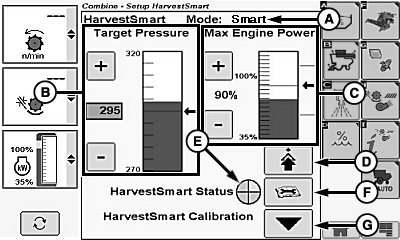
Current Mode of Operation (A)
- OFF
- Smart
- Capacity
- Target Pressure (30—420, increments of 1) (B)
- Max Engine Power (60—106 %, increments of 1) (C)
-
Advanced Setup Icon (D) - allows operator to advance to next
page to set maximum harvest speed and sensitivity
- Max Harvest Speed 2.0—14.0 km/h (1.2—8.6 mph), increments of 0.1 km/h (0.1 mph)
- Sensitivity (1—100, increments of 1)
- Harvest Smart™ Status Indicator (E) - allows operator to view what state Harvest Smart™ is currently in
- Diagnostic Readings Icon (F) - assists operator in providing more information about machine subsystem for troubleshooting
- Harvest Smart™ Calibration (G) - allows operator to enter current Harvest Smart™ operating characteristics into memory
|
GreenStar is a trademark of Deere & Company VisionTrak is a trademark of Deere & Company 1 Appears on GreenStar™ display (if equipped) instead of on armrest display. |
OU90500,000053E-19-20160203 |