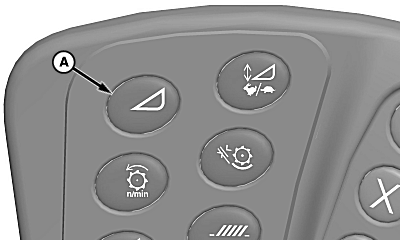
Header Adjust Switch
NOTE:
H94660-UN-27JAN10
A - Header Adjust Switch
Depending on machine options and header types, number of switch presses will vary. Press switch until desired adjustment is shown on display.Press header adjust switch (A) as needed to adjust the following.
Cutterbar Pressure Adjust
NOTE: Only works on HydraFlex platforms.
Cutterbar pressure adjust allows operator to increase or decrease the amount of pressure in the cutterbar.
-
Touch plus (+) or minus (-) symbol or rotate selection dial to increase or decrease pressure and setpoint.
-
Display shows operator adjustment settings.
Float Position Adjust
NOTE: Only works on 600D Drapers.
Header Height Sensing (off the ground) must be enabled to adjust float position. This is not available with Header Height Sensing (on the ground).
Header Height Sensing must not be enabled to adjust float pressure.
Float position adjust allows operator to increase or decrease the amount of pressure in the gauge wheel and float frame cylinders.
-
Touch plus (+) or minus (-) symbol or rotate selection dial to increase or decrease gauge wheel and float frame cylinders pressure and setpoint.
- Values are adjustable from 1 to 10 with a default of 5.
- Level land machines should have a setting of 3 or lower.
-
Lateral tilt machines should start with a setting of 5.
NOTE: Value should be set lower for issues where cut height
is not remaining level (left to right). Steeper slopes should have
a lower value.
-
Display shows operator adjustment settings.
Belt Speed Adjust
NOTE: Only works on drapers and belt pickups.
Draper belt speed adjust allows operator to increase or decrease belt speed.
-
Touch plus (+) or minus (-) symbol or rotate selection dial to increase or decrease belt speed.
-
Display shows operator adjustment settings.
Draper Cutterbar Tilt Adjust
NOTE: Only works on 600 series drapers.
Draper cutterbar tilt adjust allows operator to increase or decrease cutterbar angle.
-
Touch plus (+) or minus (-) symbol or rotate selection dial to adjust cutterbar angle.
- Increase tilts cutterbar down.
- Decrease tilts cutterbar up.
-
Display shows operator adjustment settings.
Hydraulic Feeder House Fore/Aft Tilt Adjust
NOTE: Only works if equipped with hydraulic feeder house fore/aft tilt.
Hydraulic feeder house fore/aft tilt adjust allows operator to increase or decrease angle of feeder house tilt frame.
-
Touch plus (+) or minus (-) symbol or rotate selection dial to adjust angle of feeder house tilt frame.
- Increase tilts feeder house tilt frame angle forward.
- Decrease tilts feeder house tilt frame angle rearward.
-
Display shows operator adjustment settings.
Side Belt Reduction Speed Adjust
NOTE: Only works on draper platforms.
Side belt reduction speed adjust allows operator to choose a reduced setpoint speed for the side belts.
-
Touch plus (+) or minus (-) symbol or rotate selection dial to increase or decrease side belt speed.
-
Display shows operator adjustment settings.
|
OU90500,0000543-19-20160204 |