Select Yield Wet or Dry and Cut Width Change
Yield Wet or Dry:
NOTE:
H96262-UN-04MAY10
Harvesting Information Icon
H105591-UN-27JUN12
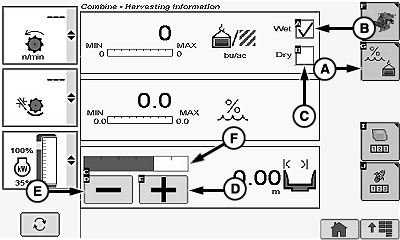
A - Yield Information Icon
B - Yield Wet Box
C - Yield Dry Box
D - Plus Icon
E - Minus Icon
F - Cut Width Adjust Bar Graph
Harvesting information icon switches between corn and wheat based on type of header connected to machine.Touch or press confirm switch when harvesting information icon is highlighted.
Touch or press confirm switch when yield information icon (A) is highlighted.
Touch or press confirm switch when desired yield wet box (B) or yield dry box (C) is highlighted.
Box displays a checkmark indicating which was selected.
- Yield Wet - shows number of yield units per number of area units at current harvesting conditions.
- Yield Dry - shows number of yield units per number of area units after taking into consideration the removal of moisture.
Cut Width:
NOTE: If GreenStar display is installed, cut width/rows are adjusted through GreenStar display and only shown on armrest display.
Touch or press confirm switch when plus (+) icon (D) or minus (-) icon (E) is highlighted. Desired cut width is represented on bar graph (F).
NOTE: Cut width number updates depending on which icon was selected.
|
OUO6075,000040F-19-20120627 |