Harvest Smart™ Feed Rate—Best Practices
Calibrate System:

H94473-UN-31MAR10
Combine Setup Icon
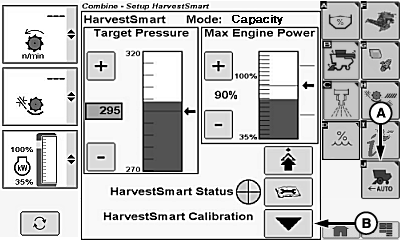
H106450-UN-04JAN13
Capacity Screen Shown
A - Harvest Smart™ Feed Rate Setup Icon
B - Grain Loss Calibration Icon
Touch or press confirm switch when combine setup icon is highlighted.Touch or press confirm switch when Harvest Smart™ Feed Rate setup icon (A) is highlighted.
Operate machine in desired crop at acceptable throughput and loss level for 15-20 seconds ensuring steady operation (allows rotor pressure and loss levels to steady).
Touch or press confirm switch when grain loss calibration icon (B) is highlighted. Calibrating sets the following parameters:
- Target Volume (Throughput)
- Target Loss
- VisionTrak™ Loss Calibration Factor
Activate System:
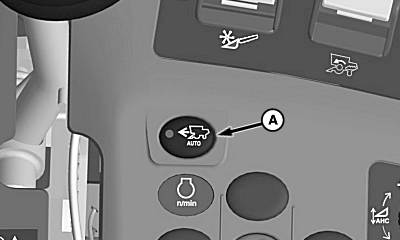
H95948-UN-06APR10
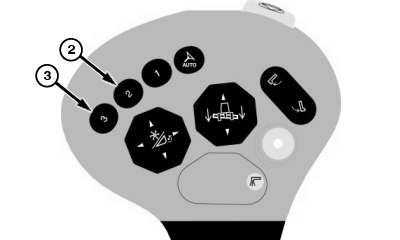
H95956-UN-01NOV10
A - Harvest Smart™ Feed Rate Enable Switch
Press Harvest Smart™ feed rate enable switch (A) until Smart or Capacity mode is shown on display:- Smart mode - is the recommended method.
- Capacity mode - if losses are not a concern or VisionTrak™ is not reliable due to conditions.
Press activation button 2 or 3 on multi-function lever to activate system and move multi-function lever forward allowing system to increase speed accordingly to crop density.
NOTE: System will not command a speed greater than multi-function lever position.
|
OUO6075,0001286-19-20130104 |