Yield Calibration
IMPORTANT:
H94478-UN-31MAR10
Diagnostic Icon
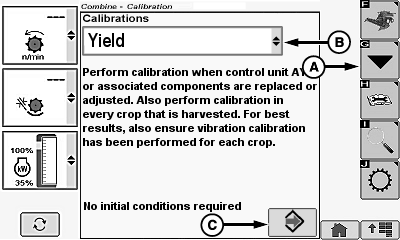
H106041-UN-30OCT12
A - Calibration Icon
B - Calibrations Menu
C - Enter/Accept Icon
Calibration must be performed every year and in every crop that is harvested to achieve accurate grain weight measurements.For best results also verify that vibration calibration has been performed for each crop.
-
NOTE: Do NOT turn around on end rows or crossing waterways while
preforming calibration.
Keep a consistent flow rate within the calibration load (monitor flow rate on VisionTrak™ performance monitor and adjust ground speed accordingly). - Calibrate loads at different flow rates (know what each calibration load characteristic is in case one must be deleted or more loads must be added).
- Keep all calibration loads approximately the same weight.
Achieving High Accuracy Calibrations:
Touch or press confirm switch when diagnostic icon is highlighted.
Touch or press confirm switch when calibration icon (A) is highlighted.
Touch or press confirm switch when calibrations menu (B) is highlighted.
Touch or press confirm switch when Yield is highlighted.
Touch or press confirm switch when enter/accept icon (C) is highlighted.
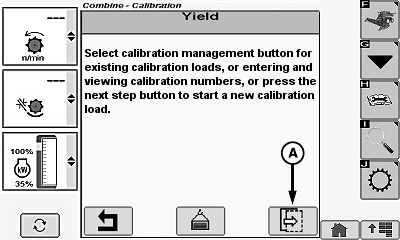
H106174-UN-14NOV12
A - Next Page Icon
Touch or press confirm switch when next page icon (A) is highlighted.
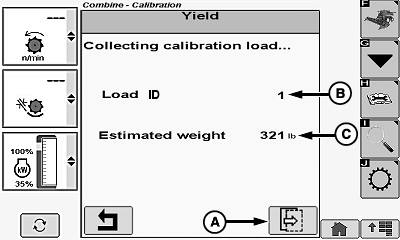
H106043-UN-30OCT12
A - Next Page Icon
B - Load ID
C - Estimated Weight
Touch or press confirm switch when next page icon (A) is highlighted.- Load ID (B) - shows current load ID number during calibration.
-
NOTE: A minimum 1,360 kg (3,000 lb.) of crop must be harvested
for calibration to be accepted.
Estimated Weight (C) - shows combine collected weight for load collected by mass flow system during calibration.
H106175-UN-14NOV12
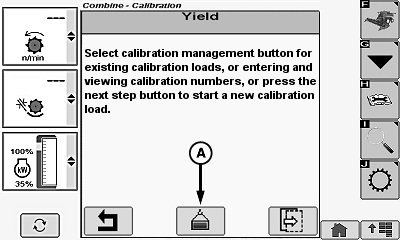
A - Calibration Management Icon
Touch or press confirm switch when calibration management icon (A) is highlighted.-
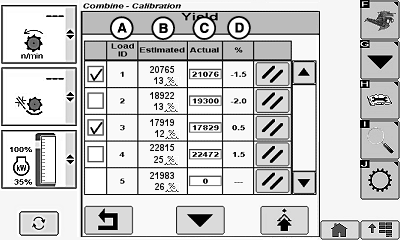
H106045-UN-30OCT12A - Load Identification
B - Estimated Weight
C - Actual Weight
D - Percent Error
Load Identification (A) - shows collected load ID numbers for future references. - Estimated Weight (B) - shows weight for load collected by mass flow system during calibration.
- Actual Weight (C) - shows operator entered load weight.
-
Percent Error (D) - shows percentage of difference between estimated
weight and actual weight.
Formula:
Error % = 100 x (Estimated - Actual) ÷ Actual
Example:
0.5% = 100 x (17919 - 17829) ÷ 17829
Clear Load ID and Yield Values:
NOTE:
H106048-UN-30OCT12
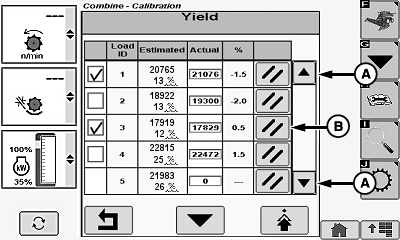
A - Up/Down Arrow Icons
B - ID Clear Icon
13 load identification numbers can be saved before memory is full and one or more calibration loads must be deleted before another load can be collected.Touch or press confirm switch when up/down arrow icons (A) are highlighted to scroll list until desired load ID is shown.
Touch or press confirm switch when desired load ID clear icon (B) is highlighted.
Update Actual Weight Values:

H106046-UN-30OCT12
H106047-UN-30OCT12
A - Up/Down Arrow Icons
B - Calibration Selection Box
C - Actual Weight Menu
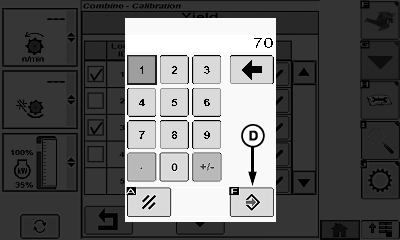
D - Enter/Accept Icon
E - Calibration Icon
Touch or press confirm switch when up/down arrow icons (A) are highlighted to scroll list until desired load ID is shown.
NOTE: Checkbox remains unavailable until actual scale weight is entered by operator.
- Limited Accuracy - user calibration procedure has not been performed. System defaults to a fixed internal calibration value which may not be adequate for different machine and field conditions.
- Single Point Calibration - user performed calibration procedure and collected one to three calibration loads. Usually adequate for fields where yields are fairly consistent, which allows consistent flow rate.
-
Multi-Point Calibration - user performed calibration procedure
and collected four or more calibration loads. Calibration accuracy
is better for fields where there are large varying yield conditions,
where flow rate is not kept consistent.
NOTE: Refer to Single Point Yield Calibration Or Multi-Point
Yield Calibration later in this section for further information.
Touch or press confirm switch when desired calibration selection box (B) is highlighted.
Touch or press confirm switch when desired actual weight menu (C) is highlighted.
Touch or press confirm switch when desired digits are highlighted.
NOTE: Repeat procedure until actual weight value is shown.
Touch or press confirm switch when enter/accept icon (D) is highlighted.
NOTE: Calibration icon must be selected to update yield calibration values. If return/back icon is highlighted, values are not saved or updated.
Touch or press confirm switch when calibration icon (E) is highlighted to update yield calibration values.
Advanced Calibration Setup:
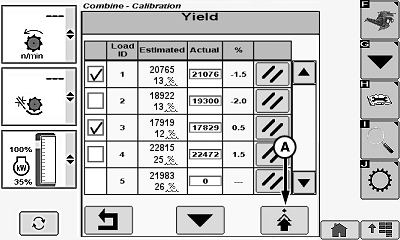
H106049-UN-30OCT12
Load Management Screen
H106050-UN-30OCT12
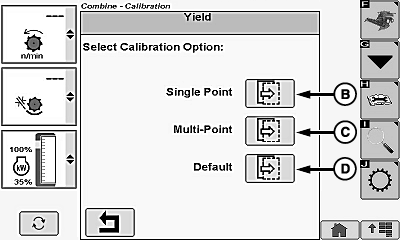
A - Advanced Setup Icon
B - Single Point Next Page Icon
C - Multi-Point Next Page Icon
D - Default Next Page Icon
Touch or press confirm switch when advanced setup icon (A) is highlighted.NOTE: Entering calibration factors is mainly to help transfer calibration values between multiple machines within the same field. It is not advisable to make up entirely new calibrations.
- Use default calibration to restore factory calibration values in case of entering errors that are not correctable.
- Entering calibration number C11 while performing a single point calibration forces a linear (single point) calibration even if the previous calibration was multi-point calibration.
- Adjusting calibration number C11 during a multi-point calibration proportionally adjusts all other calibration numbers C1—C10 based on calibration number C11 adjustment. A nonlinear calibration characteristic is preserved, but with a different intensity. Example, if calibration number C11 is increased by 10% (0.1), calibration numbers C1—C10 also increase by 10%.
- If non-proportional adjustments are needed (multi-point only), all calibration numbers must be adjusted individually.
- Single Point (B) - calibration can be modified by adjusting calibration number C11.
- Multi-Point (C) - calibration can be modified by adjusting calibration number C11 only or adjusting C11 and then adjusting all 10 calibration numbers.
- Default (D) - restores factory initial calibration numbers.
Touch or press confirm switch when desired calibration option (B—D) is highlighted.
Default Calibration:
NOTE:
H106079-UN-01NOV12
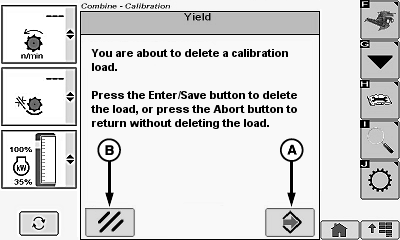
A - Enter/Accept Icon
B - Cancel Icon
The following warning message will appear:You are about to reinstate factory initial calibration numbers.
Press the Enter/Save button to continue, or press Abort button to return to the load management screen without changes.
Touch or press confirm switch when enter/accept icon (A) is highlighted to reinstate factory initial calibration numbers.
NOTE: Touch or press confirm switch when cancel icon (B) is highlighted to return to load management screen without changes.
Single Point Calibration:

H106051-UN-31OCT12

H106053-UN-31OCT12
A - Calibration Number C11
B - Enter/Accept Icon
C - Enter/Accept Icon
D - Previous Page Icon
E - Cancel Icon
NOTE: Calibration number can be adjusted manually, if magnitude of mass flow error is known.
|
Formula: |
|
New C11 = Old C11 x Actual Weight ÷ Estimated Weight |
|
Example: |
|
9048 = 8225 x 6600 ÷ 6000 |
Touch or press confirm switch when calibration number C11 (A) is highlighted.
NOTE: Calibration number ranges:
- C1: -250 to 15000
- C2—C11: 0 to 15000
Touch or press confirm switch when desired digits are highlighted.
NOTE: Repeat procedure until desired calibration value is shown.
Touch or press confirm switch when enter/accept icon (B) is highlighted.
Touch or press confirm switch when enter/accept icon (C) is highlighted to save calibration value and return to load management screen.
NOTE: Enter/accept icon must be selected to update calibration values. If cancel icon (E) is highlighted, values are not saved or updated. Display returns to load management screen.
Touch or press confirm switch when previous page icon (D) is highlighted to return to previous page if needed.
Multi-Point Calibration (C11 Only):
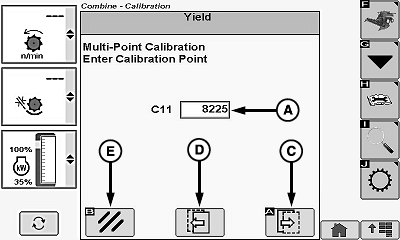
H106070-UN-31OCT12
H106053-UN-31OCT12
A - Calibration Number C11
B - Enter/Accept Icon
C - Next Page Icon
D - Previous Page Icon
E - Cancel Icon
NOTE: Calibration number can be adjusted manually, if magnitude of mass flow error is known.
|
Formula: |
|
New C11 = Old C11 x Actual Weight ÷ Estimated Weight |
|
Example: |
|
7477 = 8225 x 6000 ÷ 6600 |
Touch or press confirm switch when calibration number C11 (A) is highlighted.
NOTE: Calibration number ranges:
- C1: -250 to 15000
- C2—C11: 0 to 15000
Touch or press confirm switch when desired digits are highlighted.
NOTE: Repeat procedure until desired calibration value is shown.
Touch or press confirm switch when enter/accept icon (B) is highlighted.
Touch or press confirm switch when enter/accept icon (C) is highlighted to save calibration value and return to load management screen.
NOTE: Enter/accept icon must be selected to update calibration values. If cancel icon (E) is highlighted, values are not saved or updated. Display returns to load management screen.
Touch or press confirm switch when previous page icon (D) is highlighted to return to previous page if needed.
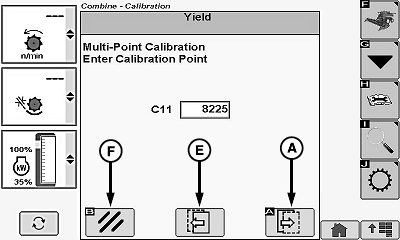
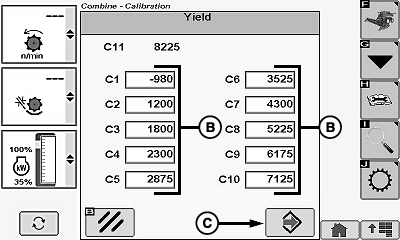
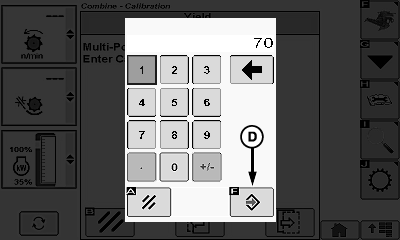
Multi-Point Calibration (C1—C10):
H106071-UN-01NOV12
H106072-UN-01NOV12
H106073-UN-01NOV12
A - Next Page Icon
B - Calibration Numbers (C1—C10)
C - Enter/Accept Icon
D - Enter/Accept Icon
E - Previous Page Icon
F - Cancel Icon
NOTE: C1—C10 calibration factors are scaled with C11 value. Any time C11 is updated on previous screen, C1—C10 will be automatically adjusted.
Touch or press confirm switch when next page icon (A) is highlighted.
Touch or press confirm switch when desired calibration numbers (B) are highlighted.
NOTE: Calibration Number Ranges:
- C1: -250 to 15000
- C2—C11: 0 to 15000
Calibration numbers C1—C10 MUST be entered in ascending order to be accepted.
Touch or press confirm switch when desired digits are highlighted.
NOTE: Repeat procedure until desired calibration value is shown.
Touch or press confirm switch when enter/accept icon (C) is highlighted.
Touch or press confirm switch when enter/accept icon (D) is highlighted to save calibration value and return to load management screen.
NOTE: Enter/accept icon must be selected to update calibration values. If cancel icon (F) is highlighted, values are not saved or updated. Display returns to load management screen.
Touch or press confirm switch when previous page icon (E) is highlighted to return to previous page if needed.
|
OUO6075,00012DF-19-20130219 |