Interactive Combine Adjustment (System Monitoring Icons)
NOTE:
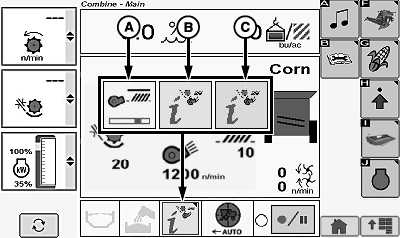
H106295-UN-14JAN13
Interactive Combine Adjustment Indicators:
- (A) Indicator (System Busy) - indicates system adjustments are being performed. Green segment underneath icon moves back and forth indicating that machine is applying settings and waiting for system to stabilize.
- (B) Indicator (Yellow Indicator) - indicates system is ready for verification of improvement settings. Icon with a yellow background flashes or turns solid (flashes for 30 seconds and turns solid) indicating that system made adjustments and is waiting for operator feedback (rating of performance parameters).
- (C) Indicator (Red Indicator) - indicates system has detected a condition shift. Icon with a red background indicates to operator that system has detected a change in machine performance. System believes that operator should evaluate performance of machine and consider optimizing the machine settings.
|
OUO6075,000135F-19-20130613 |