Harvest Smart™ Feed Rate—Max Engine Power

H94473-UN-31MAR10
Combine Setup Icon
H106441-UN-03JAN13
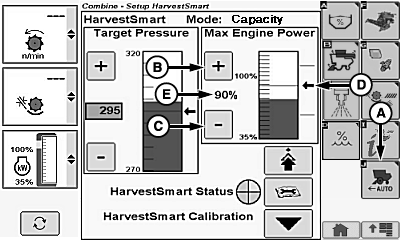
A - Harvest Smart™ Feed Rate Setup Icon
B - Plus Icon
C - Minus Icon
D - Arrow Indicator
E - Max Engine Power Percentage
Max engine power sets maximum allowable engine load at which Harvest Smart™ is allowed to operate.Touch or press confirm switch when combine setup icon is highlighted.
Touch or press confirm switch when Harvest Smart™ Feed Rate setup icon (A) is highlighted.
Touch or press confirm switch when plus (+) icon (B) or minus (-) icon (C) is highlighted to adjust max engine power.
NOTE: Bar graph indicates current engine power level. Arrow indicator and line display operator setpoint value.
Arrow indicator (D) adjusts to operator setpoint value and displays max engine power percentage (E).
System Adjustments
-
Max Engine Power Icon – use this to set maximum allowable
engine load Harvest Smart™ will allow.
- If slug feeding is a concern, decrease setting to allow for more cushion on engine load.
- Using engine load to control ground speed can be accomplished by setting value close to operating maximum engine power level. This can be done in crops where there are large header loads relative to threshing loads (example corn).
|
OUO6075,0001371-19-20130124 |