Harvest Smart™ Feed Rate—Target Pressure
NOTE:

H94473-UN-31MAR10
Combine Setup Icon
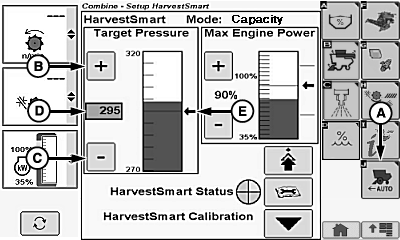
H106440-UN-03JAN13
A - Harvest Smart™ Feed Rate Setup Icon
B - Plus Icon
C - Minus Icon
D - Target Pressure Box
E - Arrow Indicator
Target pressure cannot be adjusted through the Harvest Smart™ setup screen in Smart mode.Target pressure allows operator to adjust target volume without changing VisionTrak™ loss monitor settings. Target volume measures amount of material entering separator by monitoring rotor pressure.
Touch or press confirm switch when combine setup icon is highlighted.
Touch or press confirm switch when Harvest Smart™ Feed Rate setup icon (A) is highlighted.
Touch or press confirm switch when plus (+) icon (B) or minus (-) icon (C) is highlighted or when target pressure box (D) is highlighted to adjust target pressure.
Non-Touchscreen or Touchscreen: Rotate selection dial until desired target pressure value is shown. Press confirm switch to save value.
Touchscreen Only: Enter desired target pressure value on numeric display. Touch enter/accept icon to save value.
NOTE: Bar graph indicates current target pressure level. Arrow indicator and line display operator setpoint value.
Arrow indicator (E) adjusts to operator setpoint value.
System Adjustments
-
NOTE: Target pressure cannot be adjusted through Harvest Smart™
setup screen while in Smart Mode.
Target Pressure (30—420) – use this to set target volume or throughput independently of VisionTrak™ loss monitor.- Parameter can be used when operator likes to adjust target volume (based on rotor load) without changing VisionTrak™ loss monitor calibration.
- Recommended way of adjusting target pressure is in Smart Mode using up/down arrow buttons on VisionTrak™. Performing settings through VisionTrak™ keeps target volume/loss relationship intact (example: if VisionTrak™ calibration factor is acceptable, but machine maintains a slow ground speed, increase target volume parameter by 20. If ground speed is high, decrease target volume parameter by 20).
|
OUO6075,0001372-19-20130109 |