Harvest Smart™ Feed Rate—Status Identifications

H94473-UN-31MAR10
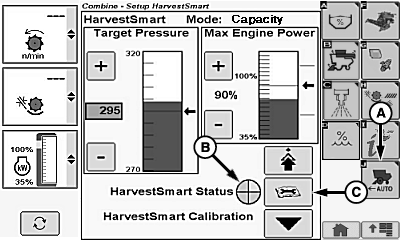
Combine Setup Icon
H106444-UN-04JAN13
H106446-UN-04JAN13
A - Harvest Smart™ Feed Rate Setup Icon
B - Harvest Smart™ Status Indicator
C - Diagnostic Readings Icon
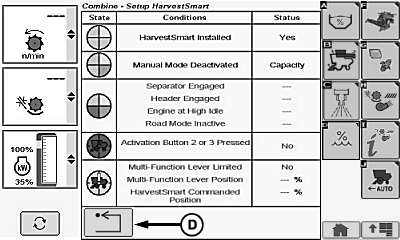
D - Return/Back Icon
Touch or press confirm switch when combine setup icon is highlighted.Touch or press confirm switch when Harvest Smart™ Feed Rate setup icon (A) is highlighted.
NOTE: Harvest Smart™ status indicator (B) shows which state that machine is currently operating in.
Touch or press confirm switch when diagnostic readings icon (C) is highlighted.
Screen displays the following machine state, condition and status information:
- Harvest Smart™ Installed
- Manual Mode Deactivated
- Separator Engaged
- Header Engaged
- Engine at High Idle
- Road Mode Inactive
- Activation Button 2 or 3 Pressed
- Multi-Function Lever Limited
- Multi-Function Lever Position
- Harvest Smart™ Commanded Position
Touch or press confirm switch when return/back icon (D) is highlighted to return to previous page.
|
OUO6075,0001374-19-20130104 |