Harvest Smart™ Feed Rate—Operation
NOTE:
H106448-UN-04JAN13
H106438-UN-03JAN13
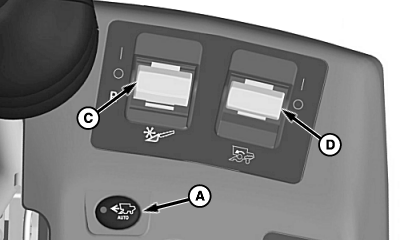
A - Harvest Smart™ Feed Rate Enable Switch
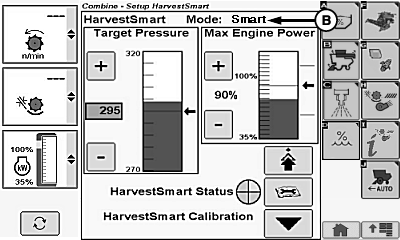
B - Smart
C - Header Engage Switch
D - Separator Engage Switch
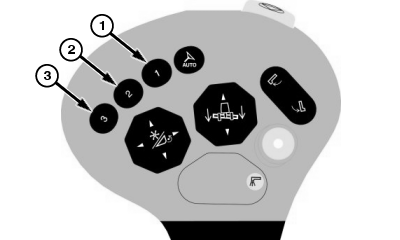
If operator leaves seat while Harvest Smart™ is activated, system will continue to operate for three seconds before system disengages and machine slows to a stop. To activate system, place multi-function lever in neutral position and press activation button 2 or 3 on multi-function lever.Press Harvest Smart™ feed rate enable switch (A) until Smart (B) is shown on display.
Turn header engage switch (C) and separator engage switch (D) ON and lower header.
H95954-UN-01NOV10
NOTE: Multi-function lever limits maximum ground speed. Move multi-function lever rearward to slow or stop machine. Move multi-function lever forward to slowly allow machine to go to operator preset ground speed.
Maximum allowable ground speed is shown on CommandCenter™ display.
 CAUTION: Once activation button 1 is pressed machine will accelerate
to multi-function lever position, returning full control of multi-function
lever to operator.
CAUTION: Once activation button 1 is pressed machine will accelerate
to multi-function lever position, returning full control of multi-function
lever to operator.
When coming to end of field, press activation button 1 on multi-function lever. This temporarily deactivates the system, allowing machine to accelerate to multi-function lever position. When system is temporarily deactivated, operator has full control of machine. Pull multi-function lever rearward to slow machine.
NOTE: It can take up to five minutes for Harvest Smart™ to determine an average harvest speed after a new calibration is entered. This speed is then used to resume machine ground speed when entering crop and Harvest Smart™ is active.
When entering crops, press activation button 2 or 3 on multi-function lever to reactivate system and move multi-function lever fully forward.
|
OUO6075,0001375-19-20130124 |