Harvest Smart™ Feed Rate—Max Harvest Speed

H94473-UN-31MAR10
Combine Setup Icon
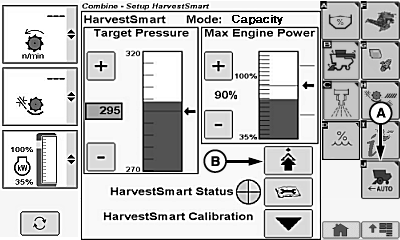
H106442-UN-03JAN13
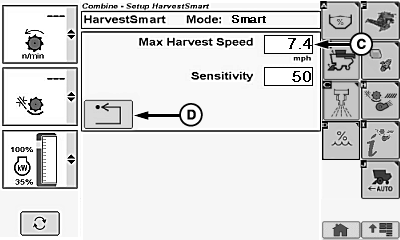
H106492-UN-08JAN13
A - Harvest Smart™ Feed Rate Setup Icon
B - Advanced Setup Icon
C - Max Harvest Speed Box
D - Return/Back Icon
Max harvest speed sets maximum allowable ground speed for Harvest Smart™ to operate. System will not exceed setting, regardless of crop volume.Touch or press confirm switch when combine setup icon is highlighted.
Touch or press confirm switch when Harvest Smart™ Feed Rate setup icon (A) is highlighted.
Touch or press confirm switch when advanced setup icon (B) is highlighted.
Touch or press confirm switch when max harvest speed box (C) is highlighted.
Non-Touchscreen or Touchscreen: Rotate selection dial until desired max harvest speed value is shown. Press confirm switch to save value.
Touchscreen Only: Enter desired max harvest speed value on numeric display. Touch enter/accept icon to save value.
Touch or press confirm switch when return/back icon (D) is highlighted to return to previous page.
System Adjustments
-
Max Harvest Speed (2.0 - 14.0 km/h) (1.2 - 8.6 mph) –
use parameter to set maximum ground speed when Harvest Smart™
is active.
NOTE: Parameters can be modified to increase functionality and
optimize performance.
- Sets a comfortable maximum ground speed without having to move multi-function lever back. Otherwise, when crop conditions change from normal yields to light yields, system increases ground speed until target pressure or multi-function lever position speed is reached.
-
One option is to set maximum ground speed 0.8—1.6 km/h
(0.5—1 mph) higher in lightest crop conditions. By limiting
maximum ground speed to just above normal operating speed, system
is more efficient (not a large speed range to adapt to and learn parameters).
NOTE: Multi-function lever position set by operator always limits
maximum ground speed.
|
OUO6075,0001376-19-20130108 |