Harvest Smart™ Feed Rate—Sensitivity

H94473-UN-31MAR10
Combine Setup Icon
H106442-UN-03JAN13
H106493-UN-08JAN13
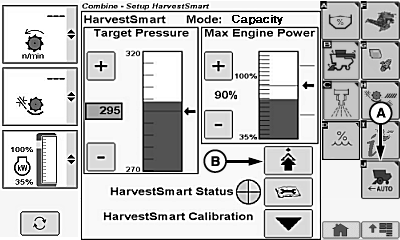
A - Harvest Smart™ Feed Rate Setup Icon
B - Advanced Setup Icon
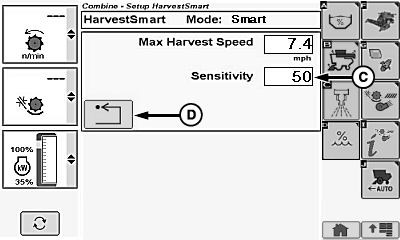
C - Sensitivity Box
D - Return/Back Icon
Sensitivity sets aggressiveness of Harvest Smart™ response to crop density changes. High response settings cause machine to make abrupt changes to ground speed maintaining crop volume. Low response settings cause machine to make less aggressive changes.Touch or press confirm switch when combine setup icon is highlighted.
Touch or press confirm switch when Harvest Smart™ Feed Rate setup icon (A) is highlighted.
Touch or press confirm switch when advanced setup icon (B) is highlighted.
Touch or press confirm switch when sensitivity box (C) is highlighted.
Non-Touchscreen or Touchscreen: Rotate selection dial until desired sensitivity value is shown. Press confirm switch to save value.
Touchscreen Only: Enter desired sensitivity value on numeric display. Touch enter/accept icon to save value.
Touch or press confirm switch when return/back icon (D) is highlighted to return to previous page.
System Adjustments
-
Sensitivity (0—100) – use this to adjust how aggressively
Harvest Smart™ makes ground speed changes.
NOTE: Parameters can be modified to increase functionality and
optimize performance.
- It is best to start low and make large (10-20) increases until ground speed changes feel too aggressive. Back down numbers from there.
- Rates vary with header because of difference in feeding function (example: corn head might perform best at high rates, whereas a draper needs low rates).
- Rates need to be adjusted based on ground speed. At slow speeds a higher rate might perform better than at high speeds. In highly variable conditions (large density changes in short distances) it is recommended to keep response rate in mid range setting (40—60).
|
OUO6075,0001377-19-20130108 |