Engine Speed Management (ProDrive™ Machines)
NOTE:
H94480-UN-31MAR10
Engine Information Icon
H108619-UN-26JUL13
H108620-UN-26JUL13
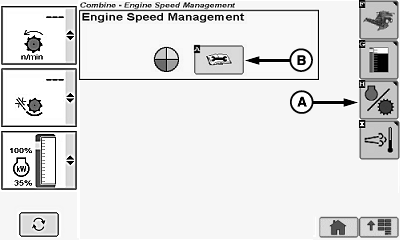
A - Engine Speed Management Icon
B - Diagnostic Readings Icon
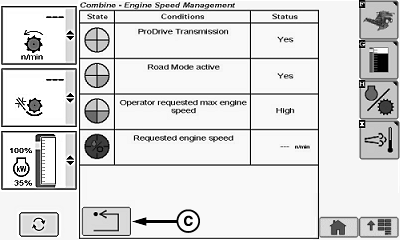
C - Return/Back Icon
Engine speed management is software-controlled and activated with road transport disconnect switch.Engine speed management reduces fuel consumption and increases fuel efficiency.
- Fuel consumption is reduced in low load conditions with a reduction in engine speed.
- Maintain high load capabilities by dynamically increasing engine speed when needed.
- Ground speed is maintained during engine speed changes through varying hydrostatic displacements.
- Engine speed stays at low idle when machine is not moving.
- Engine speed is approximately 1600 rpm when machine is on flat ground or with low ground speeds.
- Engine speed changes between approximately 1600 rpm and maximum high idle depending on the engine load.
NOTE: Engine speed indicator lights will turn OFF after a transition to field mode if the engine is not at low idle speed during the transition. Engine will remain at its current speed until one of the idle buttons is pressed.
Operator limits maximum engine speed through engine speed switches.
- Low Engine Speed - engine speed stays at 1250 rpm.
- Medium Engine Speed - engine speed will not exceed 1870 rpm.
- High Engine Speed - engine speed changes between approximately 1600 rpm and maximum high idle.
Touch or press confirm switch when engine information icon is highlighted.
Touch or press confirm switch when engine speed management icon (A) is highlighted.
Touch or press confirm switch when diagnostic readings icon (B) is highlighted.
Engine speed management screen displays the following condition and status:
- ProDrive™ Transmission
- Road Mode Active
- Operator Requested Max Engine Speed
- Requested Engine Speed
Touch or press confirm switch when return/back icon (C) is highlighted to return to previous page.
|
OUO6075,00015AE-19-20130726 |