Name Customized Crops
NOTE:
H109935-UN-28FEB14
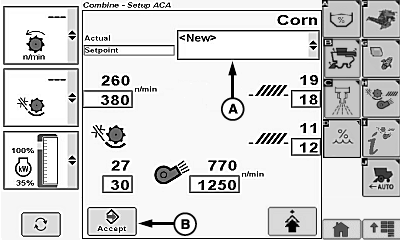
A - Crop Modifiers Menu
B - Enter/Accept Icon
Operator is allowed to save 20 custom crop settings with a limit of 20 characters, each. Personalizing machine settings will not overwrite factory settings.Touch or press confirm switch when crop modifiers menu (A) is highlighted.
Crop modifiers menu displays the following:
- Default - displays factory default settings for selected crops.
- Dry (Default) - displays factory default settings for corn.
- Wet (Default) - displays factory default settings for corn.
- New - select when a set of custom/personal crop settings will be entered.
- Clean Out - displays factory default settings allowing machine to be cleaned out.
Touch or press confirm switch when New is highlighted.
Modify machine settings as needed.
Touch or press confirm switch when enter/accept icon (B) is highlighted.
NOTE:
H87396-UN-13FEB07
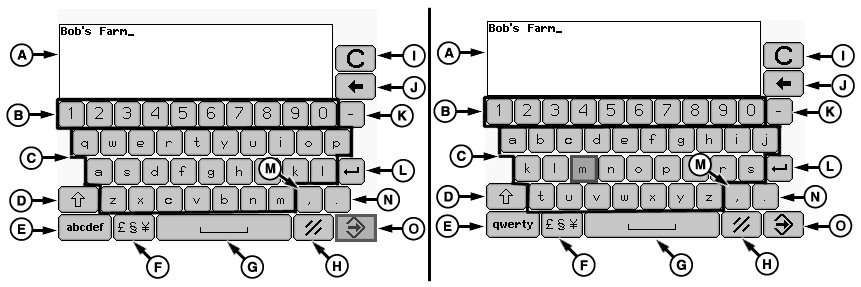
QWERTY Keyboard Layout/ABC Keyboard Layout
A - Custom Name Display
B - Numeric Keys
C - Alpha Keys
D - Caps Lock/Shift Key
E - QUERTY (Standard Typewriter Keyboard Layout) or ABC Key
F - Symbols Key
G - Space Key
H - Cancel Key
I - Clear All Key
J - Backspace Key
K - Hyphen Key
L - Enter/Return Key
M - Comma Key
N - Period Key
O - Enter/Accept Icon
Selecting symbols key (F) navigates to a another keyboard layout allowing you to select desired symbols.Alphanumeric screen appears and allows you to custom name crops.
Touch or press confirm switch when desired icon is highlighted on display keyboard.
Repeat procedure as needed to name custom crop.
Once desired custom crop is named, touch or press confirm switch when enter/accept icon (O) is highlighted.
|
OUO6075,000177C-19-20140228 |