Hydraulic Feeder House Fore/Aft Tilt (If Equipped)
NOTE:
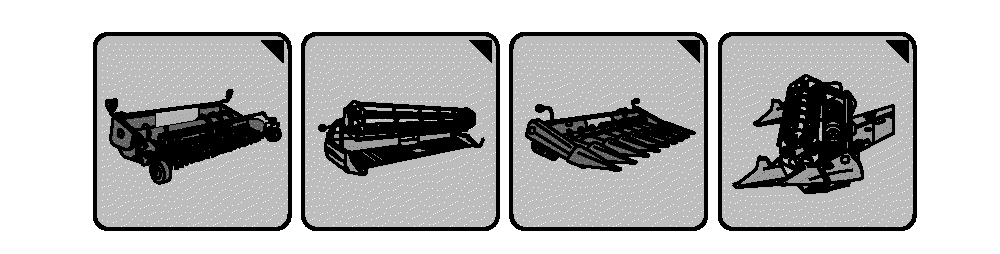
H96245-UN-03MAY10
Header Setup Icons
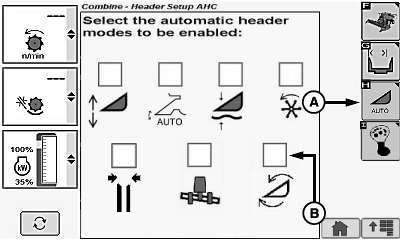
H109819-UN-12FEB14
Corn Head Display
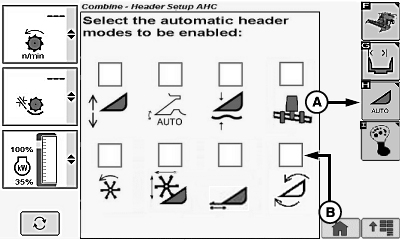
H109818-UN-12FEB14
Draper/Platform/Belt Pickup Display
A - Automatic Header Height Modes Icon
B - Feeder House Fore/Aft Tilt Icon
Header setup icon changes based on type of header connected to machine.System only works if equipped with Hydraulic Feeder House Fore/Aft Tilt.
Allows feeder house fore/aft tilt to set a correct relationship between the platform skid plates and the ground. Changing angle of cutterbar compensates for various harvesting conditions such as down crop, feeding of crop into the feeder house, and the ability to pick up the head at various angles. A sensor measures the angle of the feeder house and maintains that angle as the header moves across the ground.
System must be calibrated with each header that is used (see Calibration Procedures section).
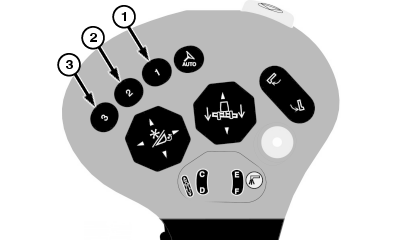
Activation buttons 1, 2 or 3 located on the multi-function lever are used to select one of the three different programmable feeder house fore/aft tilt positions.
Enable/Disable System:
Touch or press confirm switch when header setup icon is highlighted.
Touch or press confirm switch when automatic header height modes icon (A) is highlighted.
Touch or press confirm switch when Feeder House Fore/Aft icon (B) is highlighted.
NOTE: Checkmark appears indicating system is enabled or disappears indicating system is disabled.
Operation:
H109828-UN-11FEB14
H109863-UN-14FEB14
H109829-UN-11FEB14
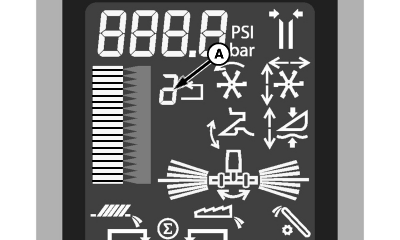
A - Activation Button Number
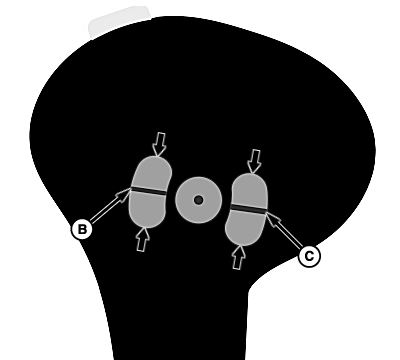
B - Hydraulic Feeder House Fore/Aft Tilt Switch
C - Hydraulic Feeder House Fore/Aft Tilt Switch
System is active when:- Engine is running.
- Road transport disconnect switch is in field position.
- Hydraulic Feeder House Fore/Aft system enabled.
- Multi-function lever switches are functionally assigned.
NOTE: Switches on rear of multi-function lever are reprogrammable.
Refer to Multi-function Lever Setup in CommandCenter™ Display Screens section for further information on reprogramming.
Activate Hydraulic Feeder House Fore/Aft tilt by pressing activation buttons 1, 2 or 3 on multi-function lever.
Activation button number (A) on display indicates which activation button was selected.
To change fore/aft tilt setpoint of activation buttons, press desired activation button and adjust fore/aft tilt using hydraulic feeder house fore/aft tilt switches (B or C).
Push and hold top of switch to tilt feeder house forward or push and hold bottom of switch to tilt feeder house rearward.
Armrest display shows the feeder house fore/aft tilt position relative to the ground based on a sensor linked to the feeder house.
Manually moving hydraulic feeder house fore/aft tilt switches (B or C) on multi-function lever deactivates system.
Press activation buttons 1, 2 or 3 to reactivate system. Hydraulic feeder house fore/aft tilt automatically moves to preselected position.
NOTE: When feeder house is raised and header is engaged, feeder house fore/aft tilt automatically moves forward allowing feeder house safety stop to be lowered onto hydraulic cylinder rod. Feeder house fore/aft tilt automatically returns to last known position when lowering.
When header is disengaged, feeder house fore/aft tilt automatically moves forward upon raising. Feeder house fore/aft tilt will not return to last known position when lowering.
|
OUO6075,000182F-19-20140611 |