Interactive Combine Adjustment (If Equipped) (In Cab Recommendations)
NOTE:

H94473-UN-31MAR10
Combine Setup Icon
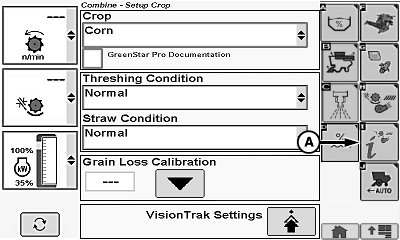
H111421-UN-12JUN14
A - Interactive Combine Adjustment Icon
Interactive Combine Adjustment system will be deactivated by an engine shut down (key OFF cycle), canceling system, or when Optimization Complete state is obtained. System does not retain past machine recommendations when Interactive Combine Adjustment is restarted.Touch or press confirm switch when combine setup icon is highlighted.
Touch or press confirm switch when Interactive Combine Adjustment icon (A) is highlighted.
Combine Improvement Targets:
NOTE:
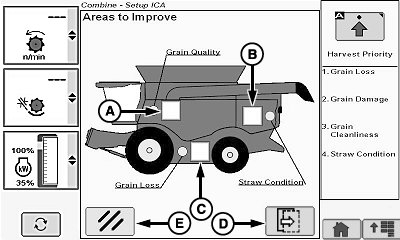
H108632-UN-29JUL13
A - Grain Quality
B - Straw Condition
C - Grain Loss
D - Next Page Icon
E - Cancel Icon
Operator can select one, two, or all three types of combine improvement target boxes.Selected area of combine changes from green to yellow.
Touch or press confirm switch when desired combine improvement target box or boxes are highlighted.
-
Grain Quality (A)
- Broken Grain
- Chaff/Husks
- Straw Pieces/Cobs
- Unthreshed Material
- Excess Tailings
-
Straw Condition (B)
- Straw Condition
-
Grain Loss (C)
- Separator Loss
- Shoe Loss
- Unthreshed Loss
Box displays a checkmark indicating which issue item or items were selected.
NOTE: Next page icon (D) is not selectable until a combine improvement target box is selected.
Touch or press confirm switch when cancel icon (E) is highlighted to cancel interactive combine adjustment setup and return to combine setup screen.
Harvest Priority Settings:
NOTE:
H108634-UN-26JUL13
H106218-UN-05DEC12
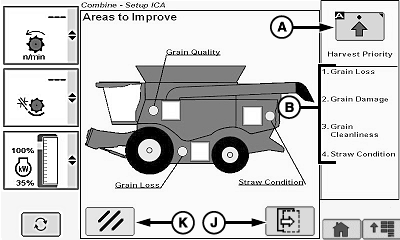
A - Setup Harvest Priority Icon
B - Harvest Priority List
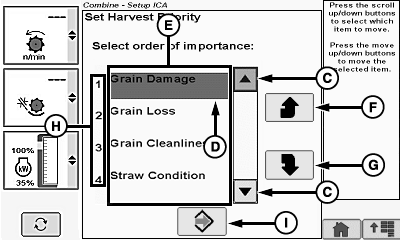
C - Up/Down Arrow Icon
D - Highlighted Region
E - Harvest Priority List
F - Selection Up Icon
G - Selection Down Icon
H - Priority Order
I - Save Icon
J - Next Page Icon
K - Cancel Icon
Setup harvest priority icon only needs to be pressed if harvest priorities have changed.Touch or press confirm switch when setup harvest priority icon (A) is highlighted to rearrange harvest priority (B).
Touch or press confirm switch when up/down arrow icon (C) is highlighted to move highlighted region (D).
Move highlighted region to desired item within harvest priority list (E).
Touch or press confirm switch when selection up icon (F) or selection down icon (G) is highlighted to move selected highlighted item higher or lower in priority order (H).
- Highest Priority
- High Priority
- Low Priority
- Lowest Priority
Repeat until list is prioritized as needed.
Touch or press confirm switch when save icon (I) is highlighted to save priority list order and return to previous screen.
Touch or press confirm switch when next page icon (J) is highlighted to advance to next page or cancel icon (K) to cancel interactive combine adjustment setup and return to combine setup screen.
Grain Loss Improvement:
NOTE:
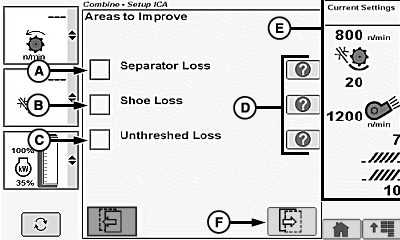
H105855-UN-05DEC12
A - Separator Loss
B - Shoe Loss
C - Unthreshed Loss
D - Help Icons
E - Informational Area
F - Next Page Icon
Screen only appears if grain loss was previously checkmarked. Select any combination of grain loss improvement for recommended machine changes.Touch or press confirm switch when desired grain loss improvement box or boxes are highlighted:
- Separator Loss (A)
- Shoe Loss (B)
- Unthreshed Loss (C)
NOTE: Touch or press confirm switch when desired help icon (D) is highlighted. Information area (E) switches from current machine settings to help information area which provides more details on improvements.
Touch or press confirm switch when next page icon (F) is highlighted to advance to next page.
NOTE: Touch or press confirm switch when previous page icon is highlighted to return to previous page if needed.
Grain Quality Improvement:
NOTE:
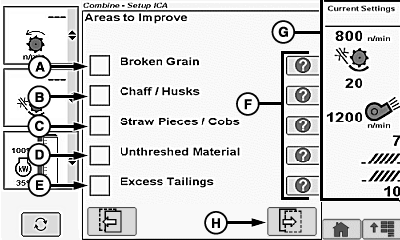
H105856-UN-05DEC12
A - Broken Grain
B - Chaff/Husks
C - Straw Pieces/Cobs
D - Unthreshed Material
E - Excess Tailings
F - Help Icons
G - Informational Area
H - Next Page Icon
Screen only appears if grain quality was previously checkmarked. Select any combination of grain quality improvements for recommended machine changes.Touch or press confirm switch when desired grain quality improvement box or boxes are highlighted:
- Broken Grain (A)
- Chaff/Husks (B)
- Straw Pieces/Cobs (C)
- Unthreshed Material (D)
- Excess Tailings (E)
NOTE: Touch or press confirm switch when desired help icon (F) is highlighted. Information area (G) switches from current machine settings to help information area which provides more details on improvements.
Touch or press confirm switch when next page icon (H) is highlighted to advance to next page.
NOTE: Touch or press confirm switch when previous page icon is highlighted to return to previous page if needed.
Recommended Machine Changes:
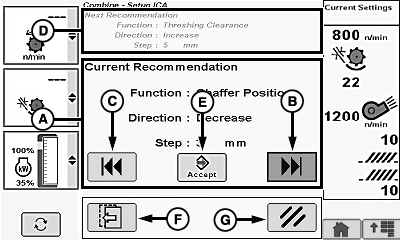
H108635-UN-26JUL13
A - Current Recommendation Area
B - Next Recommendation Icon
C - Previous Recommendation Icon
D - Next Recommendation Area
E - Enter/Accept Icon
F - Previous Page Icon
G - Cancel Icon
Current recommendation area (A) displays the recommended machine setting changes.NOTE: Next recommendation icon or previous recommendation icon may be grayed out if there are no more recommendations.
Touch or press confirm switch when next recommendation icon (B) or previous recommendation icon (C) is highlighted to advance to next recommendation or return to previous recommendation.
NOTE: Next recommendation area (D) displays upcoming adjustment proposed by the system.
Touch or press confirm switch when enter/accept icon (E) is highlighted to make proposed machine adjustment.
Touch or press confirm switch when previous page icon (F) is highlighted to return to previous page.
NOTE: Touch or press confirm switch when cancel icon (G) is highlighted to cancel recommendation. Previous machine adjustments will be retained.
Interactive Combine Adjustment system will be deactivated by an engine shut down (key OFF cycle), canceling system, or when Optimization Complete state is obtained. System does not retain past machine recommendations when Interactive Combine Adjustment is restarted.
Interactive Combine Adjustment (System Monitoring):
NOTE:
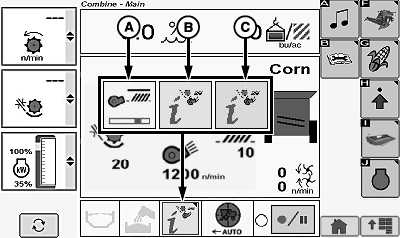
H106295-UN-14JAN13
Touch or press confirm switch when Interactive Combine Adjustment indicator (A—C) is highlighted.
- (A) Indicator (System Busy) - indicates system adjustments are being performed. Green segment underneath icon moves back and forth indicating that machine is applying settings and waiting for system to stabilize.
- (B) Indicator (Yellow Indicator) - indicates system is ready for verification of improvement settings. Icon with a yellow background flashes or turns solid (flashes for 30 seconds and turns solid) indicating that system made adjustments and is waiting for operator feedback (rating of performance parameters).
- (C) Indicator (Red Indicator) - indicates system has detected a condition shift. Icon with a red background indicates to operator that system has detected a change in machine performance. System believes that operator should evaluate performance of machine and consider optimizing the machine settings.
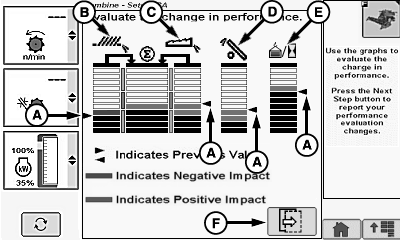
H108636-UN-26JUL13
A - Arrow Indicators
B - Shoe Loss Indicator
C - Separator Loss Indicator
D - Tailings Volume Indicator
E - Mass Flow Indicator
F - Next Page Icon
Arrow indicators (A) display previous values before Interactive Combine Adjustment system made recommended machine setting changes.NOTE: Bar graphs are a visual guide to see if an increase or decrease occurs over a certain period of time.
-
Shoe Loss Indicator (B)
- Green bars indicate that loss levels are lower than they previously were and that performance has improved.
- Red bars indicate that loss levels are higher than they previously were.
-
Separator Loss Indicator (C)
- Green bars indicate that loss levels are lower than they previously were and that performance has improved.
- Red bars indicate that loss levels are higher than they previously were.
-
Tailings Volume Indicator (D)
- Green bars indicate that less tailings volume is being monitored.
- Red bars indicate that more tailings volume is being monitored.
-
Mass Flow Indicator (E)
- Green bars indicate that feedrate has increased.
- Red bars indicate that feedrate has decreased.
Touch or press confirm switch when next page icon (F) is highlighted to advance to next page.
Verify Improvement Settings:
NOTE:
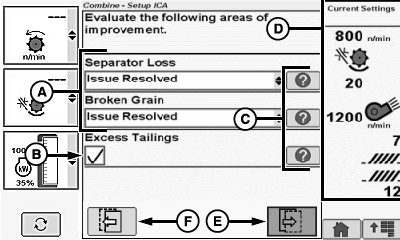
H105860-UN-06DEC12
A - Parameter Menus
B - Excess Tailings Box
C - Help Icons
D - Informational Area
E - Next Page Icon
F - Previous Page Icon
This is an example of a possible condition. Always follow information shown on display.Allows operator to answer a series of questions on each parameter to help improve previous loss and quality conditions.
Touch or press confirm switch when desired parameter menu (A) is highlighted:
- Broken Grain
- Chaff/Husks
- Straw Pieces/Cobs
- Unthreshed Material
- Straw Condition
- Separator Loss
- Shoe Loss
- Unthreshed Loss
- Excess Tailings
Each parameter menu displays the following:
- Issue Resolved
- Better
- No Change
- Worse
Once desired selection is chosen, touch or press confirm switch.
Repeat as needed on remaining parameter menus.
Touch or press confirm switch when excess tailings box (B) is highlighted.
- Checked - excess tailings continues to exist.
- Unchecked - excess tailings condition improved.
NOTE: Touch or press confirm switch when desired help icon (C) is highlighted. Information area (D) switches from current machine settings to help information area which provides more details on improvements.
Touch or press confirm switch when next page icon (E) is highlighted to advance to next page.
NOTE: Touch or press confirm switch when previous page icon (F) is highlighted to return to previous page if needed.
Verify Previously Acceptable Parameter Settings:
NOTE:
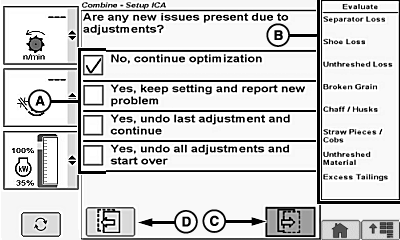
H108680-UN-30JUL13
A - System Evaluation Box
B - Parameters Not Previously Selected
C - Next Page Icon
D - Previous Page Icon
This is an example of a possible condition. Always follow information shown on display.Allows operator to verify that parameters not previously selected are still acceptable or are now unacceptable.
Touch or press confirm switch when desired system evaluation box (A) is highlighted:
- No, continue optimization - allows operator to continue to optimize system. System continues to give recommended machine changes.
- Yes, keep setting and report new problem - allows operator incorporate a new issue with an existing issue(s). System continues to give recommended machine changes.
- Yes, undo last adjustment and continue - allows operator to undo previous recommended machine change and continue with other recommendations.
- Yes, undo all adjustments and start over - allows operator to undo all recommended machine changes performed by system and will exit Interactive Combine Adjustment.
Parameters not previously selected (B):
- Broken Grain
- Chaff/Husks
- Straw Pieces/Cobs
- Unthreshed Material
- Straw Condition
- Separator Loss
- Shoe Loss
- Unthreshed Loss
- Excess Tailings
Touch or press confirm switch when next page icon (C) is highlighted to advance to next page.
NOTE: Touch or press confirm switch when previous page icon (D) is highlighted to return to previous page if needed.
Recommended Machine Changes:
H108635-UN-26JUL13
A - Current Recommendation Area
B - Next Recommendation Icon
C - Previous Recommendation Icon
D - Next Recommendation Area
E - Enter/Accept Icon
F - Previous Page Icon
G - Cancel Icon
Current recommendation area (A) displays the recommended machine setting changes.NOTE: Next recommendation icon or previous recommendation icon may be grayed out if there are no more recommendations.
Touch or press confirm switch when next recommendation icon (B) or previous recommendation icon (C) is highlighted to advance to next recommendation or return to previous recommendation.
NOTE: Next recommendation area (D) displays upcoming adjustment proposed by the system.
Touch or press confirm switch when enter/accept icon (E) is highlighted to make proposed machine adjustment.
Touch or press confirm switch when previous page icon (F) is highlighted to return to previous page.
NOTE: Touch or press confirm switch when cancel icon (G) is highlighted to cancel recommendation. Previous machine adjustments will be retained.
Interactive Combine Adjustment system will be deactivated by an engine shut down (key OFF cycle), canceling system, or when Optimization Complete state is obtained. System does not retain past machine recommendations when Interactive Combine Adjustment is restarted.
Optimization Complete:
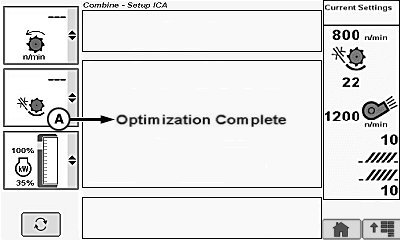
H106314-UN-10DEC12
A - Optimization Complete
Optimization complete (A) appears on display when no further machine recommendations are needed.NOTE: As yield and field conditions change throughout the day, Interactive Combine Adjustment parameters MUST be restarted and adjusted.
|
OUO6075,0001833-19-20140612 |