VisionTrak™ Performance Monitor (General Information)
NOTE:
H94446-UN-11NOV09

H94473-UN-31MAR10
Combine Setup Icon
H111422-UN-12JUN14
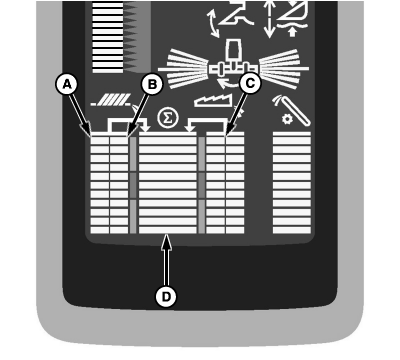
A - Shoe Activity Indicator (Left Sensor)
B - Shoe Activity Indicator (Right Sensor)
C - Separator Activity Indicator
D - Total Loss Activity Indicator
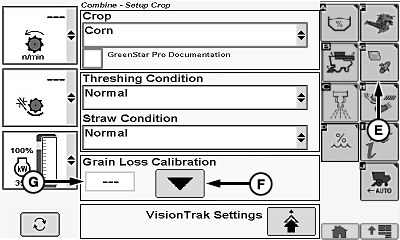
E - Crop Setup Icon
F - Grain Loss Calibration Icon
G - Grain Loss Calibration Value
VisionTrak™ is active when header is engaged and in diagnostic mode.VisionTrak™ monitor checks grain loss by measuring a representative sample of losses over the cleaning shoe and through the separator. VisionTrak™ continuously monitors machine performance to enable operator to use maximum machine capacity. A change in loss rate is indicated by bar graphs.
VisionTrak™ can be set into two modes:
Standard Mode (Factory Mode): averages shoe sensors together. These activity indicators will change sensitivity with a change in system calibration.
Shoe activity indicators (A and B) (shoe sensors averaged) and separator activity indicator (C) show the activity of each of the three sensors. Total loss activity indicator (D) shows the total hits from the three sensors. This total can be adjusted so that normal performance is shown mid scale.
Optional Mode: shows activity of each individual shoe sensor (see your John Deere dealer). These activity indicators will change sensitivity with a change in system calibration.
Shoe activity indicators (A and B) (shoe sensors indicated independently) and separator activity indicator (C) show the activity of the three sensors. Total loss activity indicator (D) shows the total hits from the three sensors. All of the bars can be adjusted so that the normal performance is shown mid scale when performing a calibration.
NOTE: Refer to VisionTrak™ Performance Monitor—Operating in this section for adjusting Shoe/Separator Loss (Balance) and Shoe/Separator Loss (Sensitivity).
Touch or press confirm switch when combine setup icon is highlighted.
Touch or press confirm switch when crop setup icon (E) is highlighted.
Adjust machine and header to acceptable loss levels for particular crop and condition. While operating at desired performance, touch or press confirm switch when grain loss calibration icon (F) is highlighted. This enters current operating characteristics into memory and centers total loss activity indicator. Grain loss calibration value (G) will also be shown for future reference. VisionTrak™ is now set up to help the operator maintain the machine performance.
NOTE: Center bar graph is now a visual guide. Operator can refer to display periodically to know when an increase or decrease in total loss amount occurs.
A sudden upward movement of bar graphs when field conditions are unchanged can indicate chaffer or sieve is plugged or closed. When this happens, stop machine and correct problem.
|
VisionTrak is a trademark of Deere & Company |
OUO6075,0001835-19-20140612 |