Harvest Smart™ Feed Rate—Initial Calibration
NOTE:
H106448-UN-04JAN13
H106449-UN-04JAN13
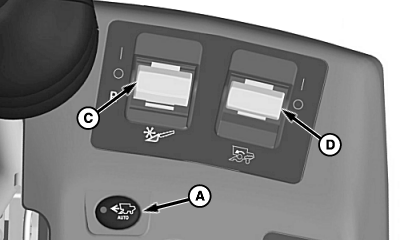
A - Harvest Smart™ Feed Rate Enable Switch
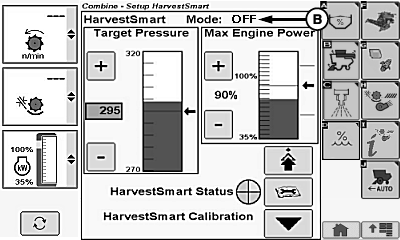
B - OFF
C - Header Engage Switch
D - Separator Engage Switch
Calibration MUST be done when harvesting crops for the first time, changing crops, or when field conditions change.Press Harvest Smart™ feed rate enable switch (A) until OFF (B) is shown on display.
Turn separator engage switch (D) and header engage switch (C) ON and lower header.

H94473-UN-31MAR10
Combine Setup Icon
H106450-UN-04JAN13
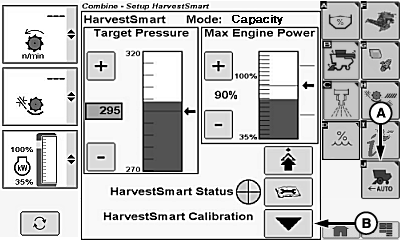
Capacity Mode Shown
A - Harvest Smart™ Feed Rate Setup Icon
B - Harvest Smart™ Calibration Icon
Touch or press confirm switch when combine setup icon is highlighted.Touch or press confirm switch when Harvest Smart™ Feed Rate setup icon (A) is highlighted.
Operate machine in consistent crop at desired loss levels, maintaining that level for 10 – 15 seconds to allow machine to stabilize.
Touch or press confirm switch when Harvest Smart™ calibration icon (B) is highlighted. This sets material flow and loss targets for Harvest Smart™.
|
RP46668,00002AE-19-20190311 |