Change Machine Settings
Actual or Setpoint Settings:

H94473-UN-31MAR10
Combine Setup Icon
H109932-UN-28FEB14
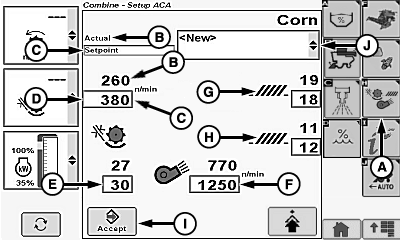
A - Machine Settings Icon
B - Actual Setting
C - Setpoint Setting
D - Threshing Speed
E - Threshing Clearance
F - Fan Speed
G - Chaffer Clearance
H - Sieve Clearance
I - Enter/Accept Icon
J - Crop Modifiers Menu
Touch or press confirm switch when combine setup icon is highlighted.
Touch or press confirm switch when machine settings icon (A) is highlighted.
- Actual Setting (B) (setpoint value in black) - indicates current setpoint value of machine.
- Setpoint Setting (C) (setpoint value in blue) - machine automatically adjusts to operator setpoint value.
Machine Settings:
NOTE: Threshing speed and fan speed setpoint values flash until separator is engaged and engine speed is above 2000 rpm.
Touch or press confirm switch when one of the following is highlighted:
-
Threshing Speed (D)
- 200 - 1000 rpm, increments of 10 rpm
-
Threshing Clearance (E)
- 0 - 40 mm1, increments of 1 mm
-
Fan Speed (F)
- 620 - 1350 rpm, increments of 10 rpm
-
Chaffer Clearance (G)
- 0 - 22 mm (General Purpose) and 0 - 30 mm (Deep Tooth)1, increments of 1 mm
-
Sieve Clearance (H)
- 0 - 20 mm (General Purpose and Deep Tooth)1, increments of 1 mm
Non-Touchscreen or Touchscreen: Rotate selection dial until desired machine value is shown. Press confirm switch to save value.
Touchscreen Only: Enter desired machine value on numeric display. Touch enter/accept icon to save value.
Touch or press confirm switch when enter/accept icon (I) is highlighted to allow modified machine settings chosen by operator to automatically adjust and/or allow operator to save personal machine settings.
Change Crop Modifiers Menu:
NOTE: Operator is allowed to save 20 custom crop settings with a limit of 20 characters, each. Personalizing machine settings will not overwrite factory settings.
Touch or press confirm switch when crop modifiers menu (J) is highlighted.
Crop modifiers menu displays the following:
- Default - displays factory default settings for selected crops.
- Dry (Default) - displays factory default settings for corn.
- Wet (Default) - displays factory default settings for corn.
- New - select when a set of custom/personal crop settings will be entered.
- Clean Out - displays factory default settings allowing machine to be cleaned out.
Once desired crop modifier is chosen, touch or press confirm switch.
Advanced Setup (Outside Machine Configuration Settings):
H109933-UN-28FEB14
H112939-UN-12FEB15
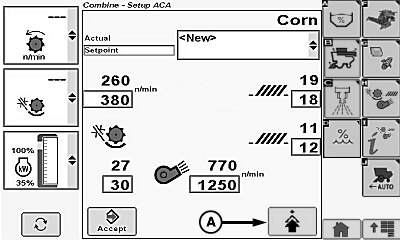
A - Advanced Setup Icon
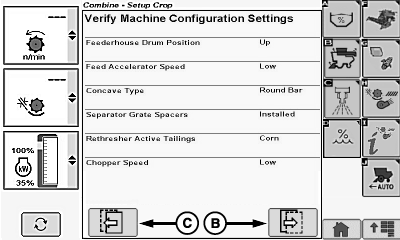
B - Next Page Icon
C - Previous Page Icon
Touch or press confirm switch when advanced setup icon (A) is highlighted.Display screen alerts operator to manually check areas around machine for recommended settings.
NOTE: Items shown on screen vary depending on machine options and selected crop.
Touch or press confirm switch when next page icon (B) (if available) is highlighted to advance to next page.
NOTE: Touch or press confirm switch when previous page icon (C) is highlighted to return to previous page.
|
1 Manual
operation is allowed above actual setting value (shown in black) and
setpoint setting value (shown in blue), which is indicated by the
word MAX. MAX is displayed until a decrease is indicated by operator.
|
SS43267,0000509-19-20150212 |