Dial-A-Speed™ System
NOTE:
H96245-UN-03MAY10
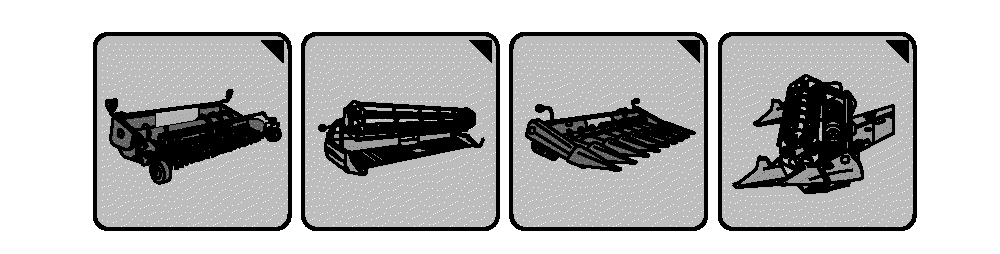
Header Setup Icons
H109804-UN-12FEB14
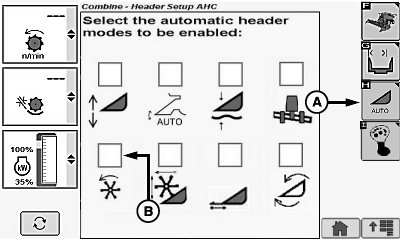
Draper/Platform/Belt Pickup Display
A - Automatic Header Height Modes Icon
B - Dial-A-Speed™ Icon
Header setup icon changes based on type of header connected to machine.Allows operator automatic control of operating speed for reel or belt pickup headers. Operating speed is a ratio of machine ground speed to reel or belt speed.
System operates with any header equipped with the appropriate reel or belt pickup speed sensors.
Enable/Disable System:
Touch or press confirm switch when header setup icon is highlighted.
Touch or press confirm switch when automatic header height modes icon (A) is highlighted.
Touch or press confirm switch when Dial-A-Speed™ icon (B) is highlighted.
NOTE: Checkmark appears indicating system is enabled or disappears indicating system is disabled.
Operation:
H98584-UN-14OCT10
H95084-UN-27JAN10
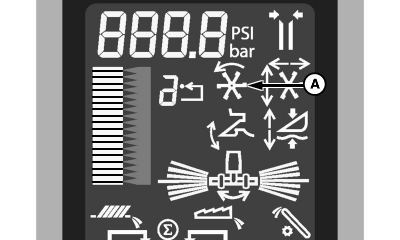
A - Dial-A-Speed™ Icon
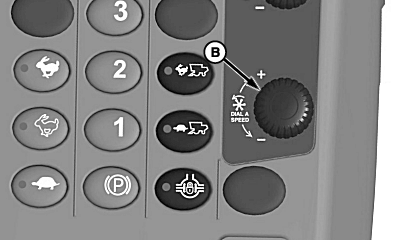
B - Dial-A-Speed™ Dial
System is active when:- Properly equipped header is connected to machine.
- Engine is running.
- Road transport disconnect switch is in field position.
- Header and separator are engaged.
- Dial-A-Speed™ system enabled.
- Ground speed greater than 0.25 km/h (0.16 mph).
NOTE: Dial-A-Speed™ system will not operate if ground speed is less than 0.25 km/h (0.16 mph).
When header is above recording stop height, reel speed will not increase while in auto mode. This prevents reel from increasing speed when turning at end of field.
Dial-A-Speed™ icon (A) appears on display indicating system is active.
Ratio of ground speed to reel or belt pickup speed is adjusted using Dial-A-Speed™ dial (B). Turn dial towards plus (+) symbol to increase reel or belt pickup speed or towards minus (-) symbol to decrease reel or belt pickup speed.
Display shows current speed ratio setting. The larger the ratio number selected, the faster the reel or belt pickup operates with respect to machine ground speed.
Change Minimum Reel or Belt Pickup Speed
H96245-UN-03MAY10
Header Setup Icons
H109862-UN-18FEB14
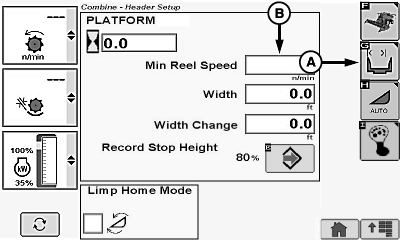
A - Header Width Setup Icon
B - Minimum Reel or Belt Pickup Speed Box
Touch or press confirm switch when header setup icon is highlighted.Touch or press confirm switch when header width setup icon (A) is highlighted.
Touch or press confirm switch when minimum reel speed or belt pickup speed box (B) is highlighted.
Non-Touchscreen or Touchscreen: Rotate selection dial until desired header value is shown. Press confirm switch to save value.
Touchscreen Only: Enter desired header value on numeric display. Touch enter/accept icon to save value.
NOTE: Minimum reel or belt pickup speed has a low range of 1 rpm.
|
Dial-A-Speed is a trademark of Deere & Company |
SS43267,000050D-19-20150216 |