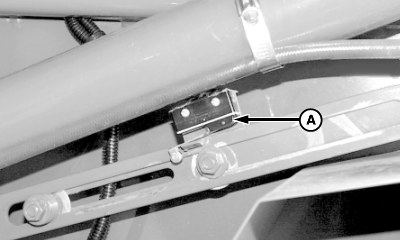
Replacing Oversize Bale Switch1. Set monitor-controller selector switch to OFF (centered) position. Turn tractor key to OFF position. Remove key. NOTE: Label wires before disconnecting from switch to ensure proper connection to new switch terminals. 2. Label wires. |
OUMX005,0000096 -19-02OCT00-1/2 |
|
3. Remove mounting hardware and bracket with switch (A). 4. Remove switch from mounting bracket. 5. Disconnect wires from switch. 6. Install new switch in reverse order of removal using the following special instructions:
|
|
OUMX005,0000096 -19-02OCT00-2/2 |