Setting Twine Spacing
|
|
|
|
|
|
|
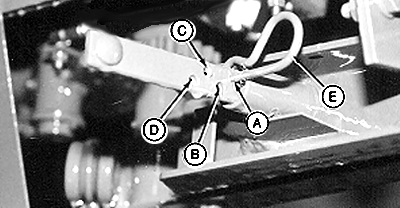
Set Mechanical Twine Arm Spacing: The monitor-controller maintains twine spacing for various bale diameters at rated PTO speed. 1. Set distance between the twine arms by installing spring pin (E) in the desired position:
2. When operating at rated PTO speed, the monitor-controller twine spacing setting should be the same as the mechanical twine arm spacing. 3. When operating less than rated PTO speed, set monitor-controller twine spacing setting less than mechanical twine arm spacing. This number will vary with different PTO speeds. Check twine spacing on bale and adjust monitor-controller setting to get desired twine spacing. Set Monitor-Controller Twine Spacing: |
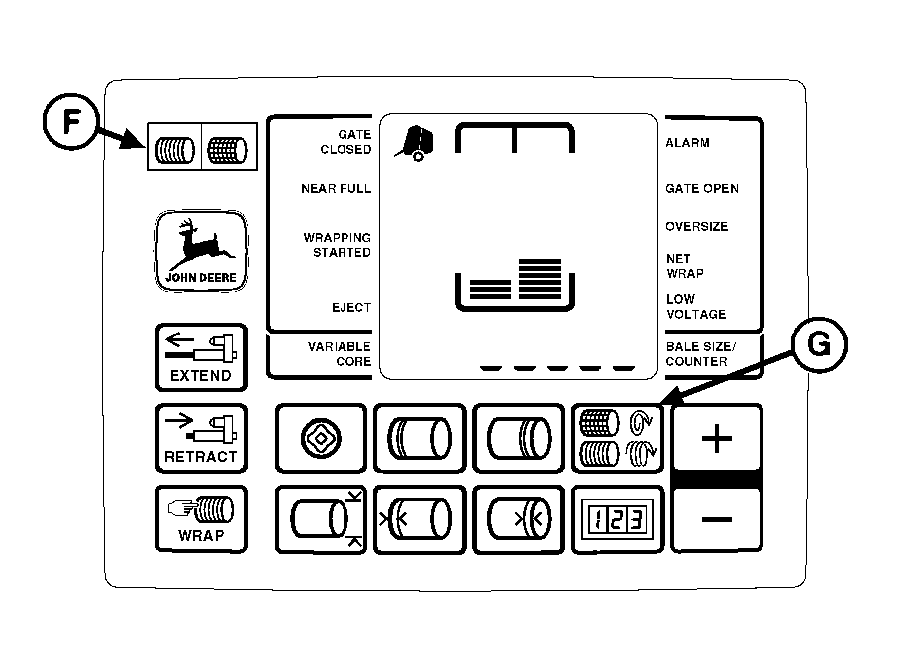
1. Turn tractor key to ON position. Do not start tractor engine. Set selector switch toward TWINE symbol (F) to turn monitor-controller ON. 2. Press and hold TWINE SPACING key (G). Press PLUS or MINUS keys until desired twine spacing, 2.0-10.0 in. (0.05-0.26 m), appears in digital display. Use the following chart as a guideline. Monitor-controller settings may vary with crop conditions and between balers.
3. Release TWINE SPACING key to enter setting into memory. Be sure monitor-controller twine spacing setting and mechanical twine arm spacing setting agree with each other. |
AG,OUMX005,1510 -19-02AUG00-1/2 |
|
4. Set monitor-controller selector switch to OFF (centered) position. Turn tractor key to OFF position. Remove key. |
AG,OUMX005,1510 -19-02AUG00-2/2 |