Setting Twine Re-Extension or Cinch Wrap Distance (Advanced Operational Information) (Channel 18)Re-Extension is a feature that may help prevent twine unrolling. It places a wrap of twine back toward the middle of the bale from the left-hand end wrap location by the distance indicated by the setting. This is done after the set number of end wraps have been applied. Cinch Wrap is a feature that may decrease loose twine and improve twine spacing on the left-hand side of the bale. It places a wrap of twine approximately 10 in. (0.25 m) away from the left-hand end wrap location prior to applying the set number of end wraps.
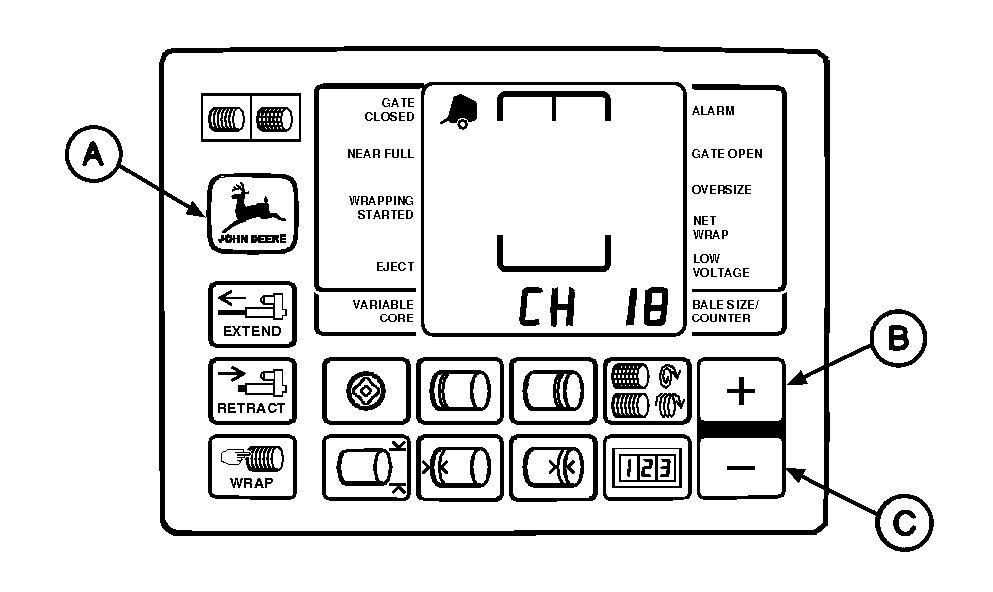
To access special wrap programs: 1. Turn tractor key to ON position. Do not start tractor engine. 2. Press and hold DEERE key (A) while setting selector switch to TWINE symbol to turn monitor-controller ON. 3. Continue to hold DEERE key (A) and press PLUS key (B) until "CH 18" appears in digital display. 4. Release DEERE key (A) and view current setting (see chart).
5. Set monitor-controller selector switch to OFF (centered) position, to enter setting into memory. |
|
|||||||||||||||||
AG,OUMX005,1512 -19-02AUG00-1/2 |
|
6. Turn tractor key to OFF position. Remove key. |
AG,OUMX005,1512 -19-02AUG00-2/2 |