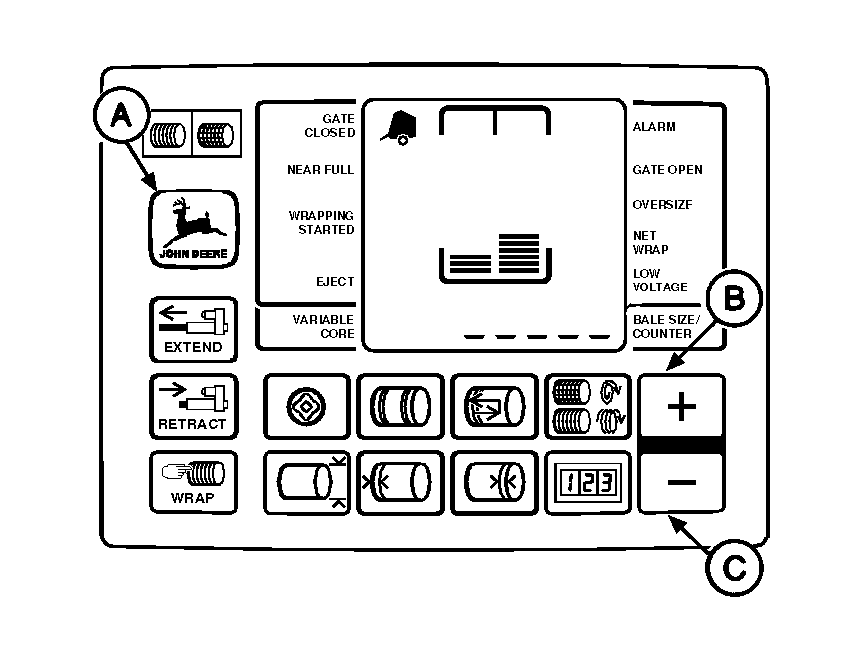
Changing Monitor-Controller Display to Metric or English UnitsNOTE: Monitor-controller is initially set to display in English units (inches; in.). To change to Metric units (meters; m): 1. Turn tractor key to ON position. Do not start tractor engine. 2. Set selector switch to TWINE or NET symbol to turn monitor-controller ON and allow it to go to normal operating mode. 3. Simultaneously press and hold DEERE (A) and PLUS key (B) approximately three seconds, until "SI" shows in digital display. Release keys. 4. Set monitor-controller selector switch to OFF (centered) position, to enter setting into memory. 5. Turn tractor key to OFF position. Remove key. To change to English units (inches; in.): 1. Turn tractor key to ON position. Do not start tractor engine. 2. Set selector switch to TWINE or NET symbol to turn monitor-controller ON and allow it to go to normal operating mode. 3. Simultaneously press and hold DEERE (A) and MINUS key (C) approximately three seconds, until "E" shows in digital display. Release keys. 4. Set monitor-controller selector switch to OFF (centered) position, to enter setting into memory. 5. Turn tractor key to OFF position. Remove key. |
|
AG,OUMX005,1514 -19-02AUG00-1/1 |