Replacing Twine Wrap Sensor
If there is crop material which is holding twine arms from moving freely during twine arm cycle, it is recommended that twine arms be manually positioned to release any "hold" they may have on the crop material. Turn off power to twine arms. This will help to make the unplugging operation easier and prevent twine arms from moving unexpectedly while your hands may be in the path of the twine arms. Stay out of the path of twine arms at all times when power to twine arms is ON. 1. Set monitor-controller selector switch to OFF (centered) position. Turn tractor key to OFF position. Remove key. |
|
 CAUTION:
Twine arms can move unexpectedly when twine arm power is on. Stay out of the path of twine arms at all times when twine arm power is on. During service or adjustment procedures for twine arms or twine cutter mechanism, turn off power to twine arms BEFORE placing your hands in the path of twine arm travel.
CAUTION:
Twine arms can move unexpectedly when twine arm power is on. Stay out of the path of twine arms at all times when twine arm power is on. During service or adjustment procedures for twine arms or twine cutter mechanism, turn off power to twine arms BEFORE placing your hands in the path of twine arm travel.

AG,OUMX005,1541 -19-03AUG00-1/5 |
|
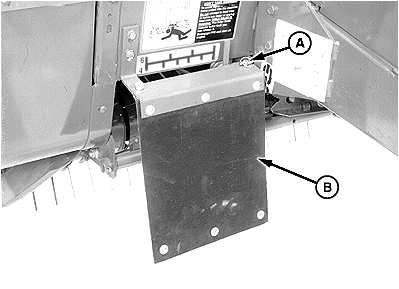
2. MEGATOOTH™ pickup; Remove quick lock pin (A) and rotate curtains (B) away from front frame. |
|
AG,OUMX005,1541 -19-03AUG00-2/5 |
|
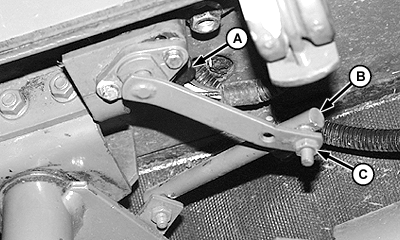
3. Remove nut (C) and disconnect link (B). 4. Disconnect wiring connector (A).
|
|
AG,OUMX005,1541 -19-03AUG00-3/5 |
|
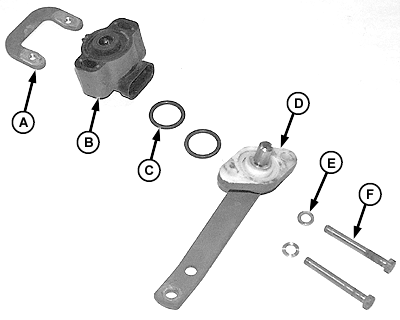
5. Remove parts (A-F). Replace sensor (B).
|
|
AG,OUMX005,1541 -19-03AUG00-4/5 |
|
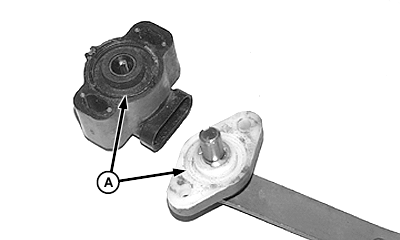
6. Install new sensor in reverse order of removal using the following special instructions:
|
|
AG,OUMX005,1541 -19-03AUG00-5/5 |