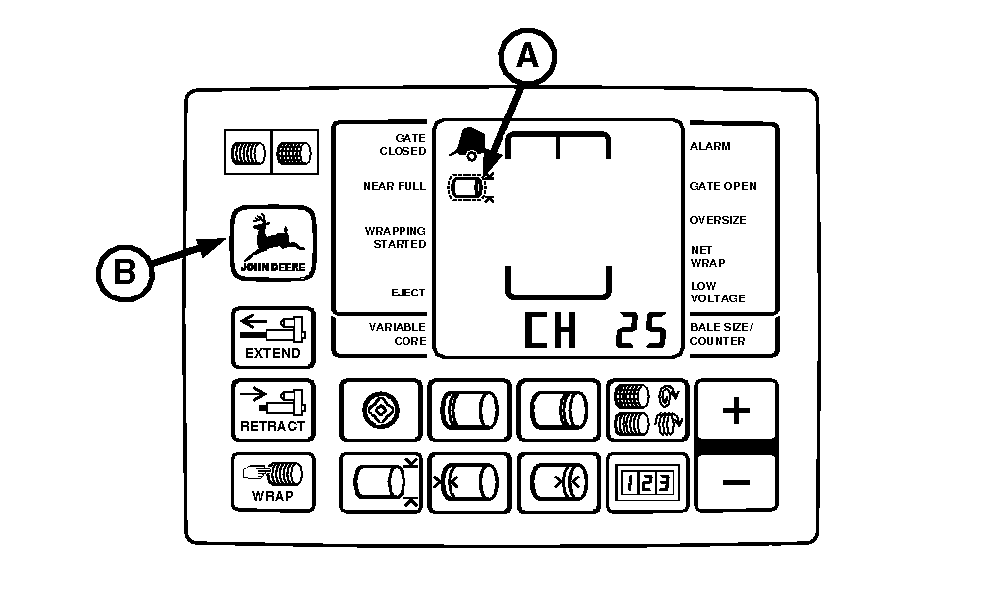
Setting Near-Full Indicator Set Point (Advanced Operational Information) (Channel 25)NEAR-FULL indicator (A) informs operator when bale has almost reached desired size, based on the bale diameter setting. The point below the diameter setting, at which the indicator comes on, is adjustable between 0.5-10.0 in. (0.01-0.27 m), in 0.5 in. (0.01 m) increments. Initial setting is 4.5 in. (0.11 m). If bale diameter is set at 72 in. (1.83 m) and the near-full distance is left at initial setting of 4.5 in. (0.11 m), the near-full indicator will come on when bale diameter reaches 67.5 in. (1.72 m). If bale diameter setting is changed, near-full indicator set point need not change, unless a different near-full distance is desired. To change near-full indicator set point: 1. Turn tractor key to ON position. Do not start tractor engine. 2. Press and hold DEERE key (B) while setting selector switch to TWINE or NET symbol to turn monitor-controller ON. 3. Continue to hold DEERE key (B) and press PLUS key until "CH 25" appears in digital display. 4. Release DEERE key and view current near full setting 0.5-10.0 in. (0.01-0.27 m). NOTE: Increasing near-full distance to highest setting of 10.0 in. (0.27 m) provides maximum time between NEAR-FULL indication and the wrapping cycle. Decreasing near full distance to lowest setting of 0.5 in. (0.01 m) will minimize the time between the NEAR-FULL indication and the wrapping cycle. 5. Use PLUS and MINUS keys to change near-full distance to desired setting. |
|
AG,OUO6017,1644 -19-04NOV99-1/2 |
|
6. Set monitor-controller selector switch to OFF (centered) position, to enter setting into memory. 7. Turn tractor key to OFF position. Remove key. |
AG,OUO6017,1644 -19-04NOV99-2/2 |