Removing Net Wrap ActuatorNOTE: Use monitor-controller channel 019 when removing net wrap actuator. This allows EXTEND and RETRACT keys to control actuator position and remove load from actuator mounting pins. 1. Open net wrap cover. |
AG,OUMX005,1555 -19-03AUG00-1/2 |
|
2.
Unlatch and fully open actuator door.
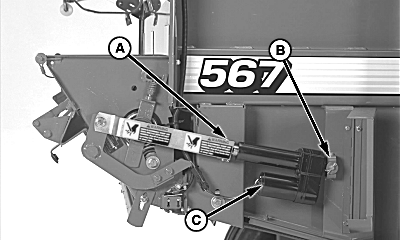
3. Turn tractor key to ON position. Do not start tractor engine. 4. With monitor-controller in NET mode, press and hold COUNTER key. Turn monitor-controller ON. "CH 001" will appear in the digital display. 5. Continue to hold COUNTER key and press PLUS key to advance to "CH 019". Release COUNTER key. NOTE: Retracting the actuator completely will cause the mounting pins to bind. 6. Press and briefly hold EXTEND key to move actuator (C) to release load from mounting pins (A and B). 7. Turn monitor-controller OFF. Turn tractor key to OFF position. Remove key. Disconnect monitor-controller power plug from tractor convenience outlet. 8. Disconnect actuator wiring connector. NOTE: Record location of washers on mounting pins used to aid in installation of actuator. 9. Remove mounting pins (A and B), washers, and actuator (C). |
|
AG,OUMX005,1555 -19-03AUG00-2/2 |