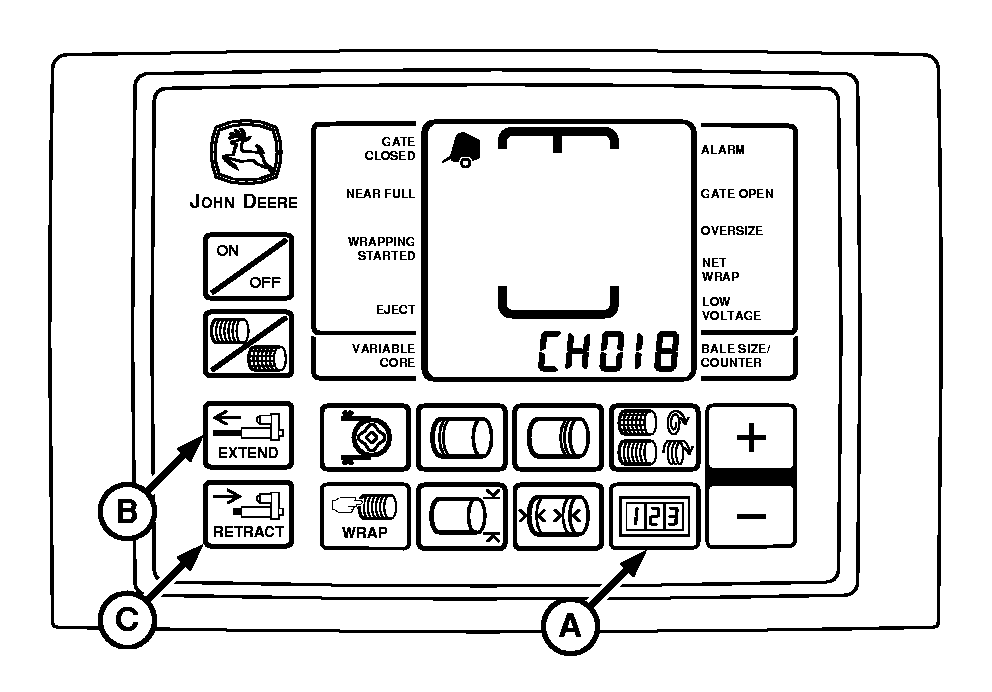
Testing Twine Wrap Actuator Current (Channel 018)IMPORTANT: Current overload protection to twine actuator is bypassed when using channel 018. Extended use of channel 018 may cause actuator damage. This test is used to determine the working condition of the actuator through its entire range of operation. To test actuator (motor and linkage): 1. Turn tractor key to ON position. Do not start tractor engine.2. Press and hold COUNTER key (A) while turning monitor-controller ON. 3. Continue to hold COUNTER key and press PLUS key until "CH 018" appears in digital display. 4. Release COUNTER key; digital display will change to show actuator current flow reading. 5. Use EXTEND and RETRACT keys (B and C) to operate actuator in both directions. Display should show a current flow reading between "1" and "8" while actuator motor is operating during mid stroke (no load).
NOTE: Twine actuator is at full stroke position when actuator is fully extended. 6. Continue to operate actuator to full stroke position. Display should show stall ( load ) current reading between "22" and "30".
|
|
AG,OUO6059,247 -19-17JUL00-1/2 |
Press RETRACT key to move twine arms to "home" position. Turn monitor-controller OFF. Turn tractor key to OFF position. Remove key. |
|
AG,OUO6059,247 -19-17JUL00-2/2 |