Checking and Adjusting Net Wrap V-Belt Idler Tension
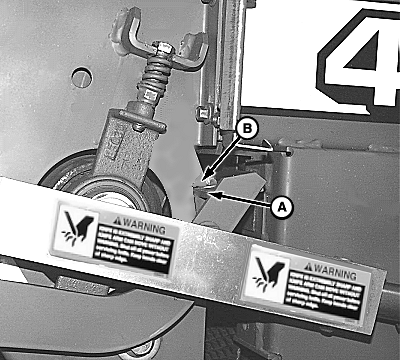
1. Remove V-belt idler pulley from left side of unit. 2. Connect monitor-controller power plug to tractor convenience outlet. 3. Turn tractor key to ON position. Do not start tractor engine. 4. With monitor-controller in NET mode, press and hold COUNTER key while turning monitor-controller ON. 5. Continue to hold COUNTER key and press PLUS key until "CH 019" appears in digital display. 6. Press EXTEND key to extend actuator fully (angle to highest position). 7. Check position of right-hand net wrap cut-off arm (A). Arm must contact tab (B) FIRMLY. If correct, proceed to Step 8. If position is not correct, adjust base end of mounting bracket as follows to obtain firm contact:
a. Disconnect monitor-controller power plug from tractor convenience outlet. |
|
 CAUTION:
Protect bystander. To prevent injury, be sure bystanders stand clear before operating net wrap unit or baler.
CAUTION:
Protect bystander. To prevent injury, be sure bystanders stand clear before operating net wrap unit or baler.

OUMX005,0000024 -19-06SEP00-1/5 |
|
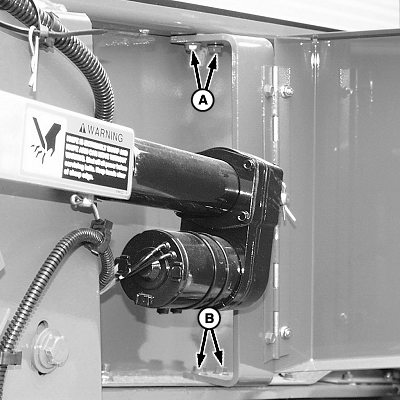
b. Loosen two screws (A) on top of bracket, two round-head bolts (B) and nuts on bottom end of bracket. c. Connect monitor-controller power plug to tractor convenience outlet. Repeat Steps 3-5. d. Retract actuator fully (to shortest position), and tighten bracket mounting bolts. e. Extend actuator and recheck for firm contact. f. Retract actuator fully. 8. Install V-belt idler pulley as removed. Tighten cap screw.
|
|
OUMX005,0000024 -19-06SEP00-2/5 |
|
9.
Right-Hand Side ONLY;
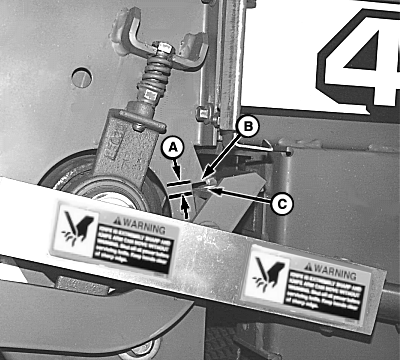
Extend actuator. Check that clearance (A) from angle (C) to tab (B) on sidesheet is within specifications.
Specification
|
|
OUMX005,0000024 -19-06SEP00-3/5 |
|
10.
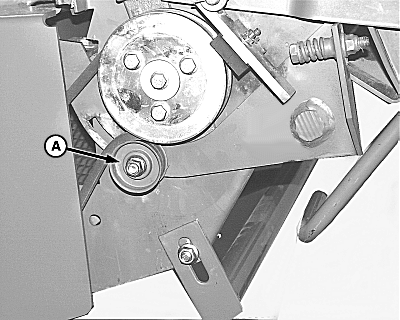
If clearance is not within specifications. Adjust idler (A) in idler arm slot until clearance is within specified range.
11. Retract actuator and re-extend to check for correct adjustment. If adjustment is still not correct, re-adjust idler (A) and re-check. 12. Close net wrap cover and shut actuator door. IMPORTANT: After adjustment, turn monitor-controller ON. Press WRAP key to return net wrap cut-off arm to home position. Turn monitor-controller off to cancel STOP alarm. If this procedure is not followed, net will be fed continuously during the next bale. 13. Connect monitor-controller power plug to tractor convenience outlet. Turn tractor key to ON position. Do not start tractor engine. Turn monitor-controller ON. 14. Cycle actuator several times using WRAP key. 15. Press WRAP key and return net knife to home (downward) position. 16. Turn monitor-controller OFF. Turn tractor key to OFF position. Remove key. Disconnect monitor-controller power plug from tractor convenience outlet. |
|
OUMX005,0000024 -19-06SEP00-4/5 |
|
17.
Perform Torque Check
Check roller torque by turning bolt (A) clockwise with torque wrench. Do not tighten bolt (A) more than 68 N·m (50 lb-ft) or damage to bolt may occur. Specification
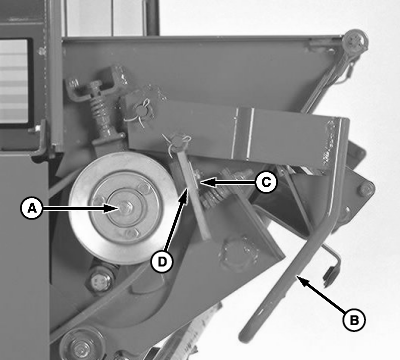
18. If torque is less than specification, net cutoff may not function correctly. Net may wrap around rubber feed roll or, net can feed over top of counterknife. 19. To adjust feed roll brake: a. Release feed roll brake by pulling out and up on handle (B). NOTE: If worn, rubber brake pad can be reversed. b. Loosen nut. Install shims (C) one at a time, between brake pad (D) and bracket until torque is within specifications. Put extra shims behind bracket. IMPORTANT: After making this adjustment, turn monitor-controller ON. Press WRAP key to return net knife arms to home position. Turn monitor-controller off to cancel STOP alarm. If this procedure is not followed, net will be fed continuously during the next bale. c. Connect monitor-controller power plug to tractor convenience outlet. Turn tractor key to ON position. Turn monitor-controller ON. d. Press WRAP key to cycle net wrap actuator. Counterknife at home (downward) position e. Turn monitor-controller OFF. Turn tractor key to OFF position. Remove key. f. Check feed roll brake torque with actuator rod retracted. If torque is not within specifications, repeat procedure. |
|
OUMX005,0000024 -19-06SEP00-5/5 |