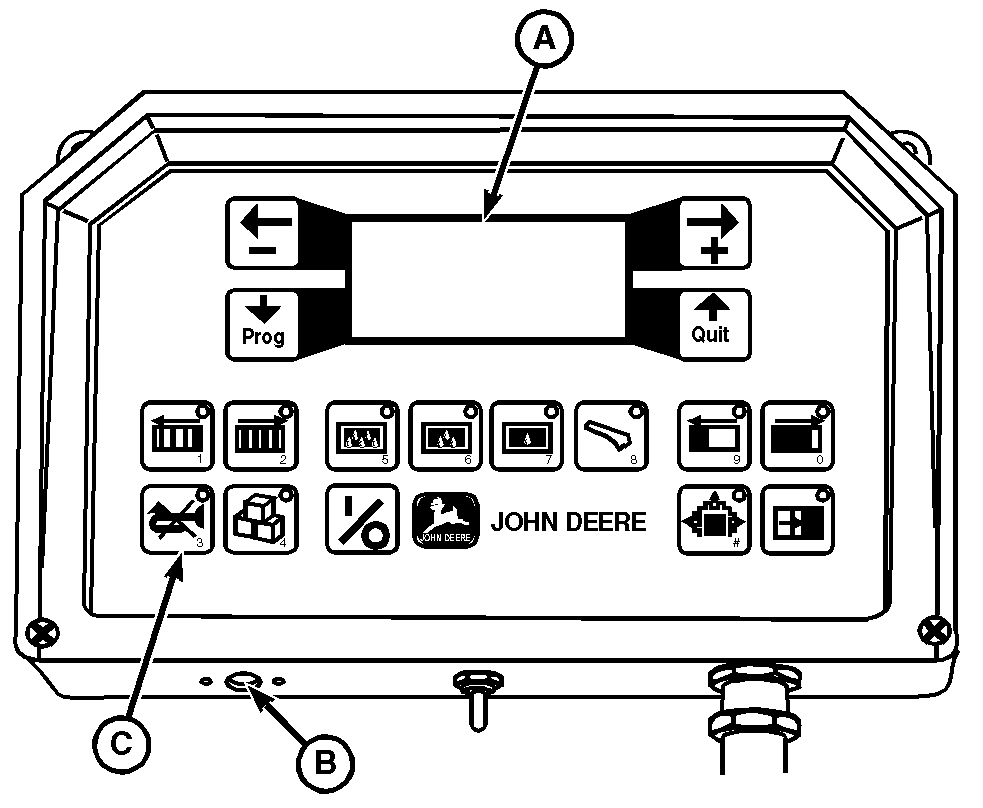
Alarm MessagesWhen malfunctions are detected by the on-board computer, the following will happen:
The following is an example of how the information will appear:
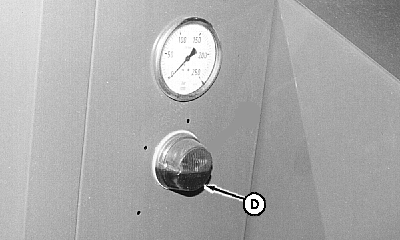
1. Press key (C) to turn off audible alarm. 2. Perform the necessary service procedures in the Solution column on the "ALARM DISPLAY AND MESSAGES" chart on the following page. Red alarm light (D) on baler will stay on until the malfunction has been corrected. Some faults (e.g. Baling thrust exceeded) are corrected automatically. 3. Press key (C) a second time to clear alarm message from the display screen. (The previous displayed information will re-appear.) The following chart demonstrates the "Alarm Number" and the "Error Display" along with the "Possible Cause" for the alarm and a "Solution" for correcting the condition which caused the alarm. The instructions under "Error Display" notify you of an immediate action required on your part or directs your attention to another area on the monitor panel. |
|
AG,OUMX005,610 -19-30MAR99-1/3 |
| ALARM DISPLAY AND MESSAGES | |||
|---|---|---|---|
| Alarm No. | Error Display | Possible Cause | Solution |
| Tensioner faulty!! | Twine broken. End of twine. Sensor leads shorted. Tension plate loose. |
Check twine. Check twine. Check for short circuit. Check for wet crop on end of sensor angle. Check twine tension plates. |
|
| 1 | Gatherer crossed!! (Stop the machine at ONCE.) |
Powr-Feed clutch slipped. Blockage in feeder entry. Erratic alarms: Packer sensor gap too wide. Packer sensor strap out of time. |
Stop machine immediately. Allow Powr-Feed to clear blockage or disengage PTO and remove blockage manually. (See Resetting Powr-Feed Clutch in Operating the Baler section.) Adjust. (See your John Deere dealer.) |
| 2 | Pressing force too great!! Bale chamber open!! |
Target density too high. | On-board computer opens bale case for one plunger stroke. Decrease target density. If error is not eliminated check electric and hydraulic systems. |
| 3, 4 | Piston force sensor on right (3) or left (4) faulty!! Check!! | Blown amplifier fuse. Calibration off. Bad or cut wire. Defective sensor or circuit board. |
Replace fuse. (See procedure in Service-Electronic Control System section.) Calibrate sensor. (See your John Deere dealer.) Check wiring harness. Repair or replace as necessary. Replace sensor. (See your John Deere dealer.) |
| 5 | Blades not engaged!! | Pre-cutter shear bolt damaged. Alarm not disabled properly. |
Replace shear bolt. (See procedure in Service-Drive, Air, Hydraulic & Lighting section.) Switch alarm off with blades engaged. |
| 6 | Knotter faulty!! | Knotter drive shear bolt damaged. Tucker finger stuck. |
Replace shear bolt. Adjust tucker fingers/shaft. Adjust roller-to-cam lobe. Adjust trip pawl. |
| 7 | OUTPUT ERROR!! PLEASE CONTROL |
Shorted circuit to electrohydraulic valve or knotter cleaner valve, if equipped. | Test power to solenoid valves. (See Checking Control Valves in Service-Drive, Air, Hydraulic & Lighting section.) Test solenoids. (See your John Deere dealer.) |
AG,OUMX005,610 -19-30MAR99-2/3 |
| ALARM DISPLAY AND MESSAGES | |||
|---|---|---|---|
| Alarm No. | Error Display | Possible Cause | Solution |
| 8 | Measr.-Sensor check! | Sensor gap too wide. Bad or cut wires Defective sensor. |
Adjust. (See procedure in Service-Electronic Control System section.) Check wiring harness. Repair or replace as necessary. Replace. (See your John Deere dealer.) |
| 9 | Calibr.-Sensor check! | Sensor gap too wide. Bad or cut wires. Defective sensor. |
Adjust. (See procedure in Service-Electronic Control System section.) Check wiring harness. Repair or replace as necessary. Replace. (See your John Deere dealer.) |
AG,OUMX005,610 -19-30MAR99-3/3 |