Operating BALETRAK PLUS® Monitor-Controller
|
|
|
|
|
|
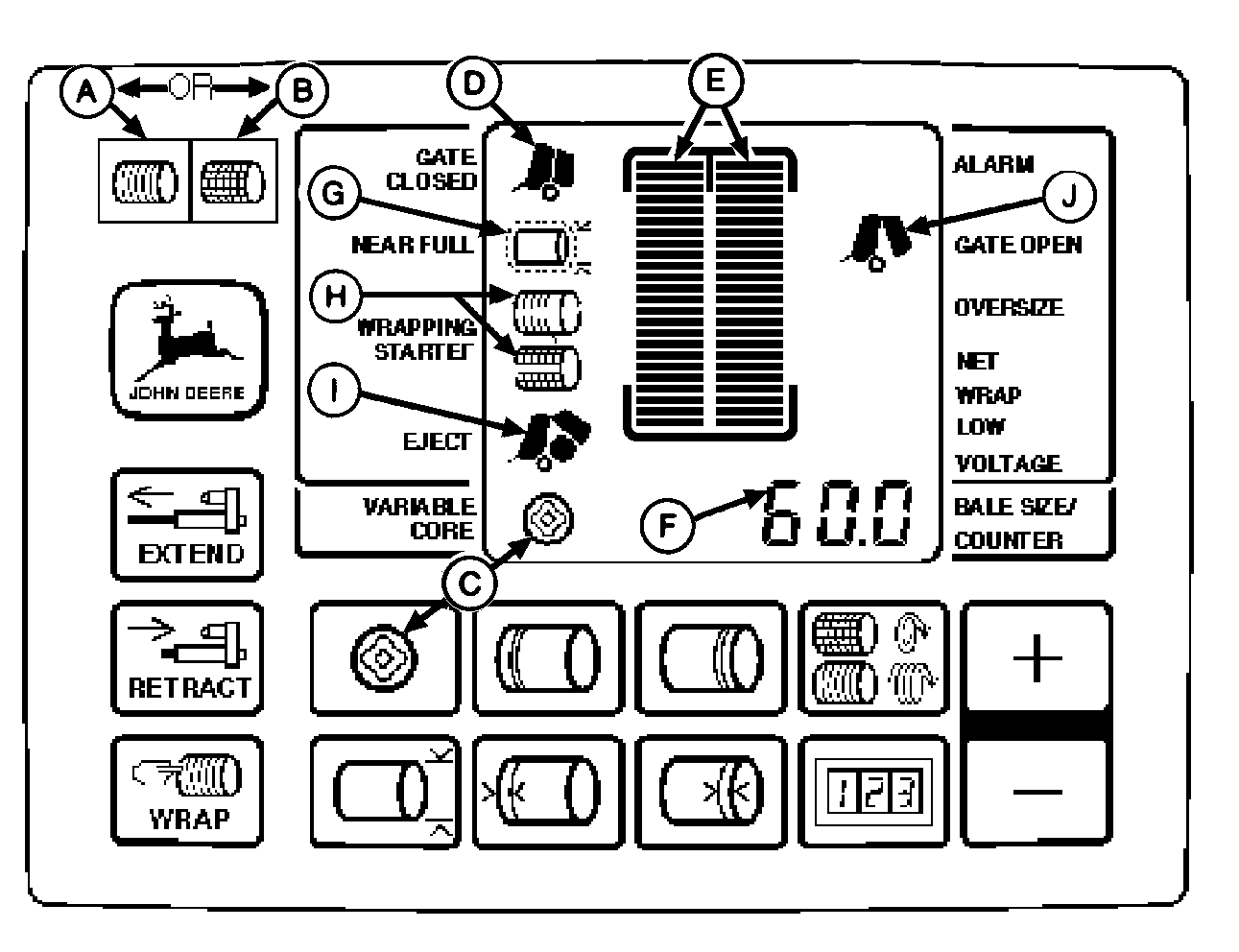
Turn tractor key to ON position. Set selector switch to TWINE (A) or NET (B) to turn monitor-controller ON. GATE CLOSED (D) should be ON. Engage PTO and raise throttle setting to PTO rated speed. Drive forward and start into windrow. Observe bale shape bars (E). Strive to keep bale shape bars in the green zone. All bars may not light during variable core forming. Avoid having bale shape bars on the red zone, as this indicates slack belts. Digital display (F) will show bale diameter increasing in 0.50 in. (0.01 m) increments within display range of 24-75 in. (0.61-1.9 m). NEAR FULL indicator (G) flashes and beeps twice when bale reaches a diameter 4-1/2 in. (0.11 m) smaller than the bale diameter setting. WRAPPING STARTED indicator (H) (Twine or Net) will light, beep, and start wrapping automatically when bale reaches diameter setting. Stop travel and |
maintain engine speed at rated PTO during wrap and ejection cycle. When wrapping with twine, observe twine arm pointer and twine pulleys on the baler for proper operation. When wrapping is completed and actuator returns to home position,
EJECT
indicator (I) will light and stay on until gate is opened.
When wrapping with net, net application and cutoff will be completed and indicated by the EJECT indicator (I) displaying and staying on until the gate is opened. Confirm twine has been cut by observing twine pulleys. Back up (if not equipped with push bar). Eject bale using hydraulic control lever. GATE OPEN indicator (J) lights during normal ejection. With bale ejected, drive forward (if not equipped with push bar). Close gate with hydraulic control lever. GATE OPEN indicator will go out and GATE CLOSED indicator will come on indicating normal operations can continue. |
|
BALETRAK PLUS is a registered trademark of Deere & Company | AG,OUO6017,1622 -19-03NOV99-1/2 |
|
A wrap and gate latch open cycle adds one bale to both the total and resetable bale counters. Resetable counter is automatically displayed for 8 seconds when a bale is added. If equipped with Variable Core solenoid valve; Depress optional VARIABLE CORE key (C) if soft core is |
desired. Variable Core indicator will light when optional variable core feature is selected. Indicator will light with or without solenoid valve installed. |
AG,OUO6017,1622 -19-03NOV99-2/2 |