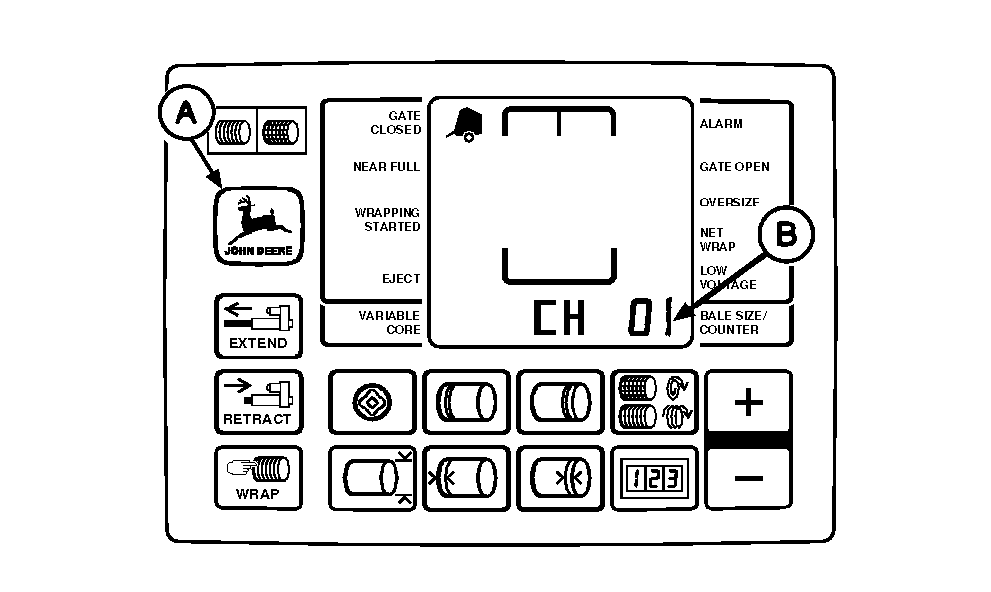
Resetting BALETRAK PLUS® Monitor-Controller To Initial Settings (Channel 01)All adjustable monitor-controller settings can be simultaneously reset to initial settings using the following procedure: 1. Turn tractor key to ON position. Do not start tractor engine. Press and hold DEERE key (A). Set selector switch to TWINE or NET symbol to turn monitor-controller ON. Hold DEERE key (A) until "CH 01" (B) is displayed.2. Release key; digital display should show "50". 3. Simultaneously press and hold PLUS and MINUS keys until digital display changes from "50" to "99"; then release keys. NOTE: Display change is a visual indication that adjusted set points have reverted back to initial settings. (See BALETRAK PLUS® MONITOR-CONTROLLER SETUP VALUES AND INITIAL SETTINGS, in this section, to see which settings have changed.) 4. Set monitor-controller selector switch to OFF (centered) position to enter initial settings into memory.
5. Turn tractor key to OFF position. Remove key. |
|
|
BALETRAK PLUS is a registered trademark of Deere & Company | AG,OUO6017,1623 -19-04NOV99-1/1 |