Understanding Twine Wrap Terms and Settings
|
|
|
|
|
|
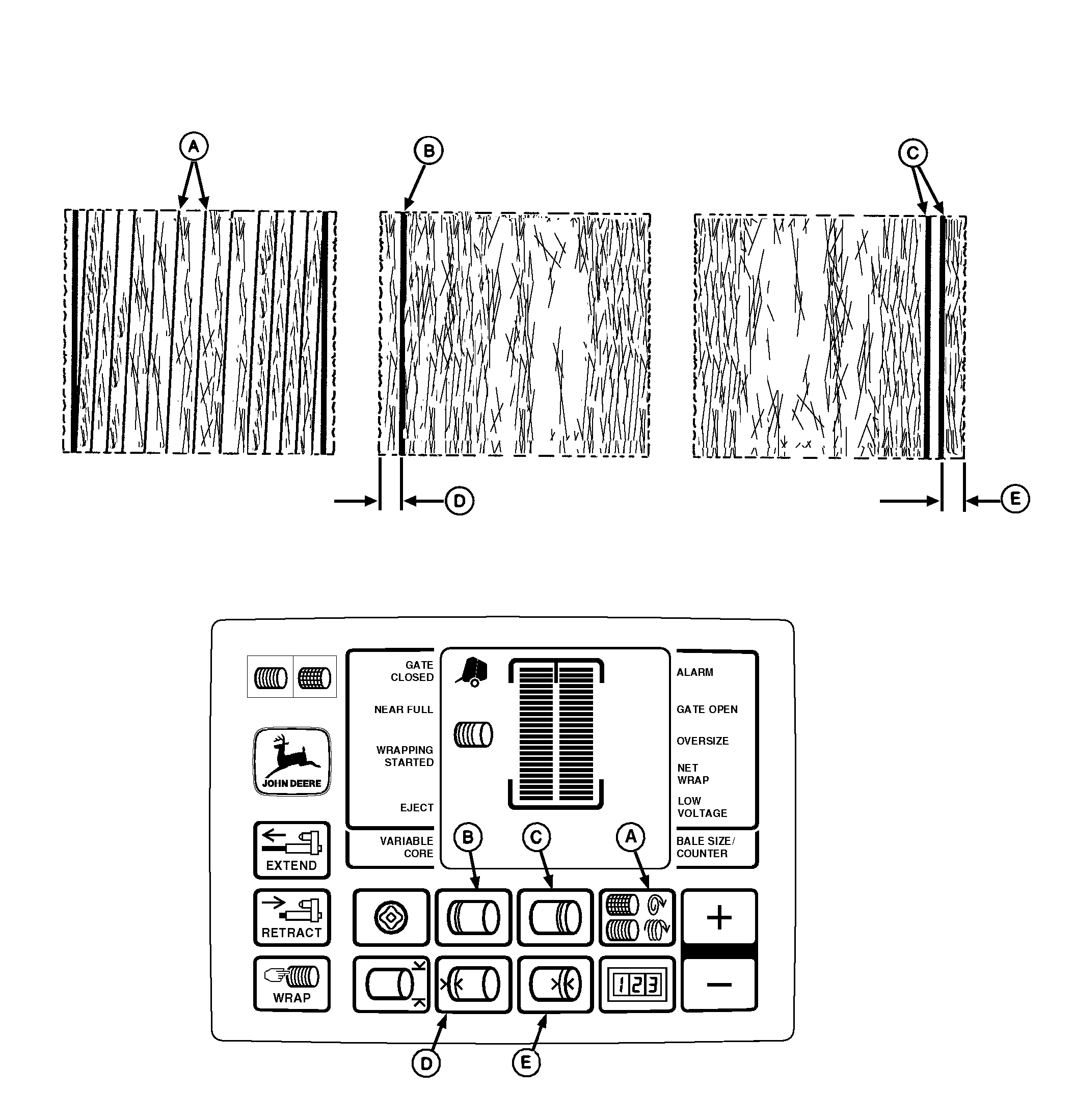
There are five factors involved in properly placing twine on the bale. The factors are: |
|
AG,OUO6017,1630 -19-04NOV99-1/2 |
NOTE: The monitor-controller is programmed to apply approximate twine spacing in the center of the bale. Twine spacing will decrease toward the ends of bale. Twine Spacing (A) is the distance between twine wraps. Spacing is increased or decreased depending on how fast the twine arms move across the bale. Mechanical twine arm spacing ranges are between 2, 4, 6, and 8. Monitor-controller twine spacing range is between 2-10 in. (0.05-0.26 m) at 0.5 in. (0.01 m) increments. Initial setting is 4 in. (0.10 m). To obtain uniform twine spacing on a bale, the setting for twine arm spacing and the monitor-controller setting for twine spacing must be the same. Number of Left-Hand End Wraps (B) and Right-Hand End Wraps (C) controls how long the twine arms pause at the end of the bale to apply the set number of end wraps for the bale diameter. End wrap setting ranges between 0.6-10 wraps. Initial setting is 2 wraps. NOTE: The setting for the number of end wraps is approximate for each twine arm. With various settings of adjustable twine guide, the twine |
Left-Hand (D) or Right-Hand (E) End Wrap Distance limits the twine arm travel to the outer ends of the bale. An initial setting of 4 in. (0.10 m) has been set for both sides. The settings can be changed in 0.5 in. (0.01 m) increments. 466/466S end wrap distance settings for left and right-hand sides range between 3-10 in. (0.08-0.25 m). 566 end wrap distance settings: NOTE: End wrap distances are an approximate indication where twine will be placed on the bale. To place twine the same distance from the edge on both ends, a slightly different setting may be required for each end. Check setting of mechanical twine guide when revising monitor-controller settings. |
AG,OUO6017,1630 -19-04NOV99-2/2 |